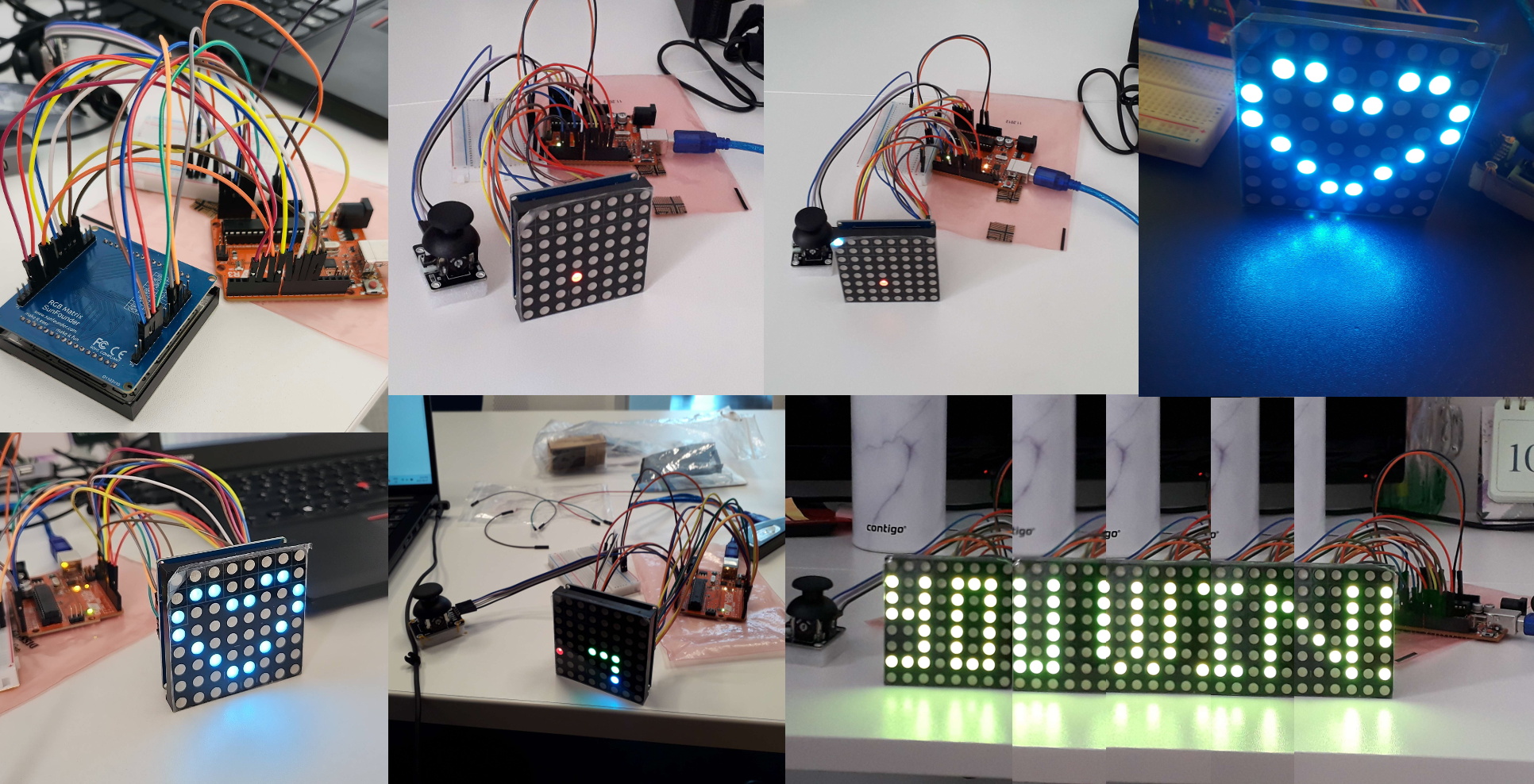
Did you ever have a project where nothing goes exactly as planned but it's still somehow really fun, well this was one of those.
I had several ideas for games using an led matrix, so I bought one but then did not have the time to use it.
Almost 2 years later I wanted to start but I could not find good documentation on how to use it because it had been replaced with a newer model which worked differently. This is a real problem because electronics without a datasheet is useless. Why cant companies be backwards compatible?!
After hours of searching I eventually found some code and a circuit diagram to try it out but I was now frustrated and put the project on hold.
For the record, my led matrix is called RGB Matrix SunFounder but in the code I found for it is called Colorduino.
The summer rolled around and my friend Nour proposed to do a project together so I pitched her my idea. 2 brains made it so much easier and way more fun.
We started with the joystick and quickly found a youtube video(see references) that gave us everything we needed, explaining exactly how both the hardware and arduino code work. I didnt know joysticks are made of 2 potentiometers.
The Joystick is connected to:
5v, GND, A5 for Xval, A4 for Yval, and D2 for the switch
We did this part in arduino since its easier to just follow a tutorial and we wanted to see some results knowing this might be the easiest part, but out of curiosity I later also wrote C code for the joystick(if you have never programmed arduino in C before check out my article about that Programming ATmega328P in C). Is it called a JOYstick because its easy or is it easy because it's a JOYstick? :)
/************
joystick: GND to GND, 5V to 5V vrX, vrY to analog input pins, and SW to digital input pin
https://components101.com/modules/joystick-module
datasheet:
https://racheldebarros.com/arduino-projects/using-a-joystick-module-with-arduino-from-wiring-to-coding/
**********/
int xPin = A5;
int yPin = A4;
int buttonPin = 2;
int xVal; // variable for storing joystick x values
int yVal; // variable for storing joystick y values
int buttonState; // variable for storing joystick switch state

void setup() {
  pinMode(xPin, INPUT);
  pinMode(yPin, INPUT);
  pinMode(buttonPin, INPUT_PULLUP);
  Serial.begin(9600); // initialize the serial monitor
}

void loop() {
  // read the x, y and joystick switch values
  xVal = analogRead(xPin);
  yVal = analogRead(yPin);
  buttonState = digitalRead(buttonPin);

  // print readings to the serial monitor
  Serial.print("X: ");
  Serial.print(xVal);
  Serial.print(" | Y: ");
  Serial.print(yVal);
  Serial.print(" | Switch: ");
  Serial.println(buttonState);

  delay(100);
}
/************
joystick: GND to GND, 5V to 5V vrX, vrY to analog input pins, and SW to digital input pin
arduino tutorial:
https://components101.com/modules/joystick-module
datasheet:
https://racheldebarros.com/arduino-projects/using-a-joystick-module-with-arduino-from-wiring-to-coding/
**********/
/*********************************************
* Joystick C code with serial monitor to display readings
*
*picocom -l -b 9600 /dev/ttyACM0
    -uno and nano have different port names. In linux for nano its ttyUSB0 and for uno its ttyACM0
    -to see the serial port
    -to end picocom type ctrl-a ctrl-x
*
* Clock frequency     : Internal clock 16 Mhz (factory default)
*********************************************/

//serial port example
#define F_CPU 16000000UL//16MHz
#include <avr/io.h>//this library is needed to use IO pins(input/output pins)
#include <avr/interrupt.h>//needed to handle interrupts
#include <stdlib.h>//standard library/general utilities
#include <string.h>//to send strings we need this library
#include <util/delay.h>//this library contains _delay_ms(x);

//define variables to set speed of serial comunication
#define BAUD 9600UL
#define UBRR ((F_CPU)/((BAUD)*(16UL))-1)//UBRR(UART Baude Rate Register)

//joystick variables
uint16_t xVal=0; // variable for storing joystick x values
uint16_t yVal=0; // variable for storing joystick y values
uint8_t buttonState=0; // variable for storing joystick switch state
#define BTNIN DDRD
#define BTNPORT PORTD
#define BTNDDR PIND //for setting as input
#define BTNPIN PD2

//to set flags
volatile struct {
  uint8_t TX_finished:1;
  uint8_t sample:1;
} flags;

static const char CRLF[3]={13, 10};//Carriage Return (ASCII 13, \r) Line Feed (ASCII 10, \n)

static volatile char *msg, TX_buffer1[10];//needs to be volatile because gets modified by interrupt

//=====================
//only transmission
void uart_tx_init(void) {
// Set the UART speed as defined by UBRR
  UBRR0H = (uint8_t)((UBRR)>>8); //load upper 8 bits
  UBRR0L = (uint8_t)UBRR;//load lower 8bits

  UCSR0B|=(1<<TXCIE0)|(1<<TXEN0); //(1<<UDRIE0) Enable TX and TX IRQ.
  UCSR0C=(3<<UCSZ00); // Asynchronous UART, 8-N-1
}

//both transmitting and reciving
void uart_init(void) { //TX and RX init with IRQ(interrupt request)
// Set the UART speed as defined by UBRR
  UBRR0H = (uint8_t)((UBRR)>>8); //load upper 8 bits
  UBRR0L = (uint8_t)UBRR;//load lower 8bits

  UCSR0B|=(1<<TXCIE0)|(1<<TXEN0); // Enable TX and TX IRQ.
  UCSR0B|=(1<<RXCIE0)|(1<<RXEN0); // Enable RX and RX IRQ
  UCSR0C=(3<<UCSZ00); // Asynchronous UART, 8-N-1
}


//======================
// UART TX ISR(interrupt service routine)
// it loads UDR as long as the "msg" contains non-zero characters
// once it finds a zero character, it sets TX_finished flag, so a new process can start transmission
//look up interrupt vector names https://ece-classes.usc.edu/ee459/library/documents/avr_intr_vectors/
ISR (USART_TX_vect) {
  msg++;
  if (*msg) UDR0=*msg;
  else flags.TX_finished=1;
}

//=========================
void send_int(int16_t data, uint8_t base, uint8_t crlf){//ex:15, 10, 1 here data=15, base =10, 1 to send new line
	while (!flags.TX_finished); //waiting for other transmission to complete
	flags.TX_finished=0;
	itoa(data, (char*) &TX_buffer1[0], base);
	if (crlf) strcat((char*)TX_buffer1, CRLF);
	msg=TX_buffer1;
	UDR0=*msg;
}

void send_string (char *str) {
	while (!flags.TX_finished); //waiting for other transmission to complete
	msg=str;
	UDR0=*msg;
	flags.TX_finished=0;
}

//==========ADC INIT==========
void init_adc(void){
    //set voltage reference,ADC channel selection is also in this register and is initialized to zero(ADC0) for now.
    ADMUX = (1<<REFS0);

    // Enable ADC, prescaler = 128 (16MHz / 128 = 125kHz)
    ADCSRA = (1<<ADEN) | (1<<ADPS2) | (1<<ADPS1) | (1<<ADPS0);
}
//=========ADC READ=========
uint16_t read_adc(uint8_t channel){
    // select ADC channel (0\u20137)
    ADMUX = (ADMUX & 0xF0) | channel;

    ADCSRA |= (1<<ADSC);          // start conversion
    while (ADCSRA & (1<<ADSC));   // wait

    return ADC;                   // 10-bit result
}
//============================
int main(void){
        //uart init
	uart_tx_init();
	flags.TX_finished=1;

	sei(); // enable interrupt
	flags.sample=1;
	//joystick init
        init_adc();
        BTNIN &= ~(1<<BTNPIN);   // PD2 as input
        BTNPORT |= (1<<BTNPIN);   // enable internal pull-up

	while (1) { //infinie loop
                xVal = read_adc(5);   // joystick X on ADC5
                yVal = read_adc(4);   // joystick X on ADC4
                buttonState=!(BTNDDR & (1<<BTNPIN));  // returns 1 when pressed
		send_string("xVal\r\n");
		send_int(xVal,10,1);
                send_string("yVal\r\n");
		send_int(yVal,10,1);
                send_string("button\r\n");
		send_int(buttonState,10,1);
		_delay_ms(1000);
	}

 return(0);
}
Now on to tackling the led matrix.
Together we did some more research and even though we struggled we were more successful this time. We found a functional arduino library for it that could display letters(see references). But too early to celebrate, we still had to figure out which pins needed to be connected where. When I first tested the led mtx when I was still doing it alone I plugged it ontop of my arduino uno, using all the pins. The datasheet I had found is a circuit diagram of the led driver which has all the same pins as the arduino even though not all are needed. We googled and googled but in wain. Eventually we gave the c code from the library to chatgpt and he somehow figured out what pins where needed even though the library declared all pins as output(that would come back to haunt us later).
Here are the needed pins:
5v, GND, arduino pins A0 through A3(aka PC0-PC3),arduino pin D3(aka PD3), arduino pin D4(aka PD4), arduino pins D6 through D13(aka PD6,PD7,PB0-PB5)
(It later turned out that A3 was not needed but otherwise chatgpt was accurate. There is an updated circuit diagram further down in this article)
With this success we tried combining the led and joystick code but combining things never goes smoothly.
It was getting late and we already go alot done so we went home and agreed to meet up again soon.
At home it dawned on me what the problem was. You know how the library had declared everything as output. If you ever write a library please never ever do that please. We declared the Xval and Yval pins as input but the library override that so off course we got garbage readings.
void _IO_Init()
{
  DDRD = 0xff; // set all pins direction of PortD
  DDRC = 0xff; // set all pins direction of PortC
  DDRB = 0xff; // set all pins direction of PortB

  PORTD = 0x00; // set all pins output is low of PortD
  PORTC = 0x00; // set all pins output is low of PortC
  PORTB = 0x00; // set all pins output is low of PortB
}
void _IO_Init(){
  DDRD = (1 << PD7) | (1 << PD6) | (1 << PD4) | (1 << PD3);//set only pins pD7,PD6, PD4 and PD3 as outputs
  DDRB = 0xff; // All PortB pins as outputs

  // Set only PC0-PC2 as outputs, leave A4 (PC4) and A5 (PC5) alone
  DDRC = (1 << PC0) | (1 << PC1) | (1 << PC2);

  // Make sure A4/A5 not driven low
  PORTC &= ~((1 << PC4) | (1 << PC5));
}
Now that we had figured that out it was time to understand how to light up individual leds. In the font.c file of the library the letters and ASCII characters where encoded with 8 hex numbers. After a bit of trial and error my friend spotted a pattern and quickly realized that the library was coding the position by column. As seen in the picture, the bottom led is 0X01, bottom and 4th down from top is 0X11, top led is 0X80, 5th down from top is 0X08, and so on.
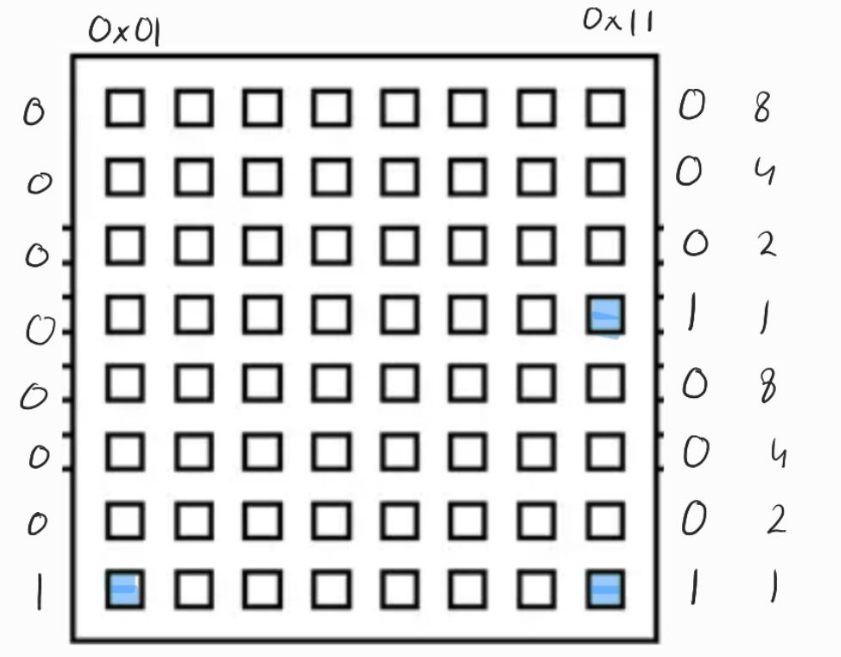
We had figured out the pattern, things where actually going to plan. We added a heart to the char font8_8 array and successfully displayed it. By the way we never figured out what the suiji symbol is supposed to be lol.
...
const unsigned char font8_8[95][8] PROGMEM =
{
...
    { 0x00, 0x00, 0x44, 0x28, 0x10, 0x28, 0x44, 0x00 },   // x
    { 0x00, 0x00, 0x1C, 0xA0, 0xA0, 0xA0, 0x7C, 0x00 },   // y
    { 0x00, 0x00, 0x44, 0x64, 0x54, 0x4C, 0x44, 0x00 },   // z
    { 0x00, 0x00, 0x00, 0x06, 0x09, 0x09, 0x06, 0x00 },   // horiz lines  ({)
    { 0x80, 0x43, 0x7E, 0x1E, 0x3E, 0x3D, 0xBB, 0xA8 },    //suiji (|)
    { 0x30, 0x48, 0x44, 0x22, 0x22, 0x44, 0x48, 0x30 }  //heart (})
};
...
Next it was time to write our own display function. We took the DispShowChar function and modified it so that it would take the data from a local variable we called mypos instead of from the external file(font.c). So far we are still displaying a heart but we did this because we need to display a gameboard array that will be modified during the game.
void ingame(unsigned playerposX,unsigned playerposY,unsigned char R,unsigned char G,unsigned char B,char bias){
	unsigned char i,j,Page_Write,temp;
	 unsigned char chrtemp[24] = {0};
	unsigned char mypos[24] = {0x30, 0x48, 0x44, 0x22, 0x22, 0x44, 0x48, 0x30};

	if(Page_Index == 0)
    	Page_Write = 1;
  	if(Page_Index == 1)
    	Page_Write = 0;
  	j = 8-bias;

	for(i = 0;i< 8;i++){
		chrtemp[j] = mypos[i];
    		j++;
  	}

	for(i = 0;i < 8;i++){
    	temp = chrtemp[i+8];
    	for(j = 0;j < 8;j++)
    	{
      if(temp & 0x80)
      {
        dots[Page_Write][j][i][0] = B;
        dots[Page_Write][j][i][1] = G;
        dots[Page_Write][j][i][2] = R;
      }
      else
      {
        dots[Page_Write][j][i][0] = 0;
        dots[Page_Write][j][i][1] = 0;
        dots[Page_Write][j][i][2] = 0;
      }
      temp = temp << 1;
    }
  }
  Page_Index = Page_Write;
}
After this success it was time to display and move the player according to the joystick inputs.
We first got confused with the bias, we thought we could us it because in the DispShowChar function it moves the letter off center, but it turns out you cant move individual dots left or right just columns. So we created a playerpos x and y variable and an 8x8 gameboard variable instead. Now all we have to do is increment or decrement the playerpos x and y variables and use these as index to the gameboard array to set the led at that position to high.
By the way we renamed the ingame function to displayboard because its more descriptive.
At this point the code starts getting super messy so you'll have to be patient until we clean it up(just scroll down a little, it's not that far).
Having a moving player is great but the player needs something to do. We needed to display a food dot for the player to catch and every time the player ate the food, the food should randomly relocate.
C is one of my favorite programming languages but the one thing it does very poorly is random number generation. After a lot of googling we eventually found some working arduino code for it, I dont fully understand the code but if it works it works.
We made lots of progress but it's not a game if you cant win.
We initially thought we could have the you win message be an array like gameboard but the letters YOU WIN! are to long for a single 8x8 led screen so we have to pan the letters and it's just easier to do that if we get it from the font.c file like the letters. We created an array called panning as seen below. This way we can pan using the bias and pretty much us the same code as the DispShowChar function.
const unsigned char panning[1][24] PROGMEM =
{
	{ 0x00, 0x00, 0x44, 0x64, 0x54, 0x4C, 0x44, 0x00, 0x30, 0x48, 0x44, 0x22, 0x22, 0x44, 0x48, 0x30, 0x00, 0x00, 0x7F, 0x04, 0x08, 0x10, 0x7F, 0x00 }   //youwin

};
Up to this point your probably thinking I'm being overdramatic, things are going as expected. Well... I never would have expected this next part.
We wanted to use the button from the joystick to restart the game if you pressed it during the you win message display. If only programming could be easy. For some reason the button readings where garbage and the serial monitor was going bonkers, displaying the debugging messages fast then slower then faster again. We commented out the entire code, we thought the library was maybe still overwriting the pin 2(that we are using for the button) to output instead of input. Nope and nope, it turns out the timer2 initialization function was the culprit, if that was commented out the button and serial printout would be totaly fine.
We where totally lost and even AI could not help us. Up to this point we where still trying to figure out how the code from the library fully worked which resulted in the code being a bit all over the place. And since we where no longer getting anywhere, it was high time to clean up. After commenting everything, throwing out the parts of the code we where not using and fixing the discrepancy between the timer2 settings and its comments, the button was still not working but at least we knew what we where doing now.
/*****************
//joystick info
//https://components101.com/modules/joystick-module
//full detail joystick
//https://racheldebarros.com/arduino-projects/using-a-joystick-module-with-arduino-from-wiring-to-coding/
//led mtx info
//connected to 5v,gnd,A0 to A3,D6 to D13, D3 and D4
******************/
#include "RGBMatrix.h"//our modified led mtx library
#include <EEPROM.h>//needed for random nb generation

//for joystick
int xPin = A5;
int yPin = A4;
//int buttonPin = 2;
int xVal; // variable for storing joystick x values
int yVal; // variable for storing joystick y values
//int buttonState; // variable for storing joystick switch state
//for game(x=7 and y=0 (top left) is start pos of player)
int foodposX=7;
int foodposY=0;
pos playerpos;
int cnt=0;//counts howmany food already eaten
int maxcnt=2;

char j = 0;//for displaying you win, needs to be global

void setup() {
  RGBMatrixInit();

  //for joystick
  pinMode(xPin, INPUT);
  pinMode(yPin, INPUT);
  //pinMode(buttonPin, INPUT_PULLUP);

  Serial.begin(9600); // initialize the serial monitor for debugging

//random
  size_t const address {0};
  unsigned int seed {};
  EEPROM.get(address, seed);
  randomSeed(seed);
  EEPROM.put(address, seed + 1);
  //print a random number from 0 to 7
  while(foodposX==7 && foodposY==0){//while foodpos=playerpos
    foodposX = random(0, 8);
    foodposY = random(0, 8);
  }
  ingame(foodposX,foodposY);//display food on led screen
}

void loop() {
  // read the x, y and joystick switch values
  xVal = analogRead(xPin);
  yVal = analogRead(yPin);
  //buttonState = digitalRead(buttonPin);

  // print readings to the serial monitor
  Serial.print("X: ");
  Serial.print(xVal);
  Serial.print(" | Y: ");
  Serial.println(yVal);
  //Serial.print(" | Switch: ");
  //Serial.println(buttonState);

  //while game on
  if(cnt<maxcnt){
    playerpos=moveplayer(xVal,yVal);//convert joystick values to gameboard values

    if(playerpos.posX==foodposX && playerpos.posY==foodposY){
      cnt++;
      if(cnt<maxcnt){
        while(foodposX==playerpos.posX && foodposY==playerpos.posY){
          foodposX = random(0, 8);
          foodposY = random(0, 8);
        }
        ingame(foodposX,foodposY);//display new food pos on led screen
      }
    }
  }if(cnt>=maxcnt){//end of game, you win message displayed
        for(j = -32;j < 8;j++){
          displaywin(32,255,255,0,j);
          delay(250);
        }
    }

 delay(100);
}
/*
  Colorduino - Colorduino DEMO for Arduino.
  Copyright (c) 2010 zzy@IteadStudio.  All right reserved.

  This DEMO is free software; you can redistribute it and/or
  modify it under the terms of the GNU Lesser General Public
  License as published by the Free Software Foundation; either
  version 2.1 of the License, or (at your option) any later version.

  This DEMO is distributed in the hope that it will be useful,
  but WITHOUT ANY WARRANTY; without even the implied warranty of
  MERCHANTABILITY or FITNESS FOR A PARTICULAR PURPOSE.  See the GNU
  Lesser General Public License for more details.

  You should have received a copy of the GNU Lesser General Public
  License along with this library; if not, write to the Free Software
  Foundation, Inc., 51 Franklin St, Fifth Floor, Boston, MA  02110-1301  USA
*/

#include "RGBMatrix.h"
/*****************************
set needed registers and define macros
*****************************/
#define RST_BIT 0x04//reset bit
#define LAT_BIT 0x02//latch bit
#define SLB_BIT 0x01//shift load bit
#define SCL_BIT 0x40//serial clock
#define SDA_BIT 0x80//serial data

#define RST PORTC
#define LAT PORTC
#define SLB PORTC
#define SDA PORTD
#define SCL PORTD
//multiplexing macros, one for each row + one to turn all off
#define open_line0	{PORTB=0x01;}
#define open_line1	{PORTB=0x02;}
#define open_line2	{PORTB=0x04;}
#define open_line3	{PORTB=0x08;}
#define open_line4	{PORTB=0x10;}
#define open_line5	{PORTB=0x20;}
#define open_line6	{PORTD=0x08;}
#define open_line7	{PORTD=0x10;}
#define close_all_line	{PORTD=0x00;PORTB=0x00;}

/*******************************************
variables
*******************************************/
/*
//Test dots
unsigned char Tdots[8][8][3]=     {{{0,0,255},     {0,0,255},      {0,0,255},     {0,0,255},    {0,0,255},      {0,0,255},       {0,0,255},        {0,0,255}},
                                  {{0,165,255},   {0,165,255},    {0,165,255},   {0,165,255},  {0,165,255},    {0,165,255},     {0,165,255},      {0,165,255}},
                                  {{0,255,255},   {0,255,255},    {0,255,255},   {0,255,255},  {0,255,255},    {0,255,255},     {0,255,255},      {0,255,255}},
                                  {{0,255,0},     {0,255,0},      {0,255,0},     {0,255,0},    {0,255,0},      {0,255,0},       {0,255,0},        {0,255,0}},
                                  {{255,127,0},   {255,127,0},    {255,127,0},   {255,127,0},  {255,127,0},    {255,127,0},     {255,127,0},      {255,127,0}},
                                  {{255,0,0},     {255,0,0},      {255,0,0},     {255,0,0},    {255,0,0},      {255,0,0},       {255,0,0},        {255,0,0}},
                                  {{255,0,139},   {255,0,139},    {255,0,139},   {255,0,139},  {255,0,139},    {255,0,139},     {255,0,139},      {255,0,139}},
                                  {{255,255,255}, {255,255,255},  {255,255,255}, {255,255,255},{255,255,255},  {255,255,255},   {255,255,255},    {255,255,255}}
                                 };
*/
//dots is the array that represents the led mtx, it has 2 pages(one active the other buffer for next display)
unsigned char dots[2][8][8][3] = {0};//initialy turn all leds of mtx off
//dots matrix array description
//[2]:Page:one for display, one for receive data(render next page to display so faster and no flickering)
//[8]:Row:8 rows in LED mtx
//[8]:Column:8 columns in ED mtx
//[3]:Color:RGB data: 0 for Red; 1 for green, 2 for Blue
unsigned char Gamma_Value[3] = {10,63,63};
//Gamma correct value, every LED plane is different.value range is 0~63
//[3]:RGB data, 0 for Red; 1 for green, 2 for Blue
//Gamma correction is a process that adjusts the brightness levels of images to match the non-linear response of the human eye or the display device
unsigned char Page_Index = 0; // the index of buffer( keep track of which "page" or buffer of the dots array is currently being displayed or is active for drawing)

unsigned char line = 0;// index to keep track of which row is being updated

//the gameboard
unsigned char gameboard[8][8] = {{0,0,0,0,0,0,0,1},
				 {0,0,0,0,0,0,0,0},
				 {0,0,0,0,0,0,0,0},
				 {0,0,0,0,0,0,0,0},
				 {0,0,0,0,0,0,0,0},
				 {0,0,0,0,0,0,0,0},
				 {0,0,0,0,0,0,0,0},
				 {0,0,0,0,0,0,0,0}
				};

//player pos intitial pos is top left(7,0)
signed int playerposX=7;
signed int playerposY=0;


/****************define the external data(from font.c file)********************/
extern unsigned char font8_8[100][8];//for displaying letters, ascii char and heart
extern unsigned char panning[1][32];//for you win(8*4 hex values for each colum)
//extern unsigned char pic[4][8][8][3];

/***********set needed pins as outputs*********************/
void _IO_Init(){
  DDRD = (1 << PD7) | (1 << PD6) | (1 << PD4) | (1 << PD3);//set only pins pD7,PD6, PD4 and PD3 as outputs
  DDRB = 0xff; // All PortB pins as outputs

  // Set only PC0-PC3 as outputs, leave A4 (PC4) and A5 (PC5) alone
  DDRC = (1 << PC0) | (1 << PC1) | (1 << PC2) | (1 << PC3);

  // Make sure A4/A5 not driven low
  PORTC &= ~((1 << PC4) | (1 << PC5));
}
/***initialize led mtx*****/
void _LED_Init(){
  LED_RST(1);
  LED_Delay(1);
  LED_RST(0);
  LED_Delay(1);
  LED_RST(1);
  LED_Delay(1);

  SetGamma();
  line = 0;

}
/****initialize timer**********/
void _TC2_Init(){
  TCCR2A = 0;
  TCCR2B |= (1<<CS22) | (1<<CS21) | (0<<CS20);   // by clk/256
  TCCR2A &= ~((1<<WGM21) | (1<<WGM20));   // Use normal mode
  TIMSK2 |= (1<<TOIE2) | (0<<OCIE2B);   //Timer2 Overflow Interrupt Enable
  //TCNT2 = 0xff;
  sei();
}

/***fct that calls all initialization fcts********/
void RGBMatrixInit(){
	_IO_Init();           //Init IO
	_LED_Init();          //Init LED Hardware
	_TC2_Init();          //Init Timer/Count2
}
/****************************************************
timer2 overflow interrupt service routine
every XXXms update led screen
****************************************************/
ISR(TIMER2_OVF_vect){
  //cli();
  TCNT2 = 0xB2; // Preload for 1.25ms period (assuming prescaler 256)
  //TCNT2 = 0x64;      //flash a led matrix frequency is 100.3Hz,period is 9.97ms
  //TCNT2 = 0x63;      //flash a led matrix frequency is 99.66Hz,period is 10.034ms
    if(line > 7) line = 0;
    close_all_line;
    run(line);
    open_line(line);
    line++;
    //sei();
}
/****************************************************
the mtx register operation fcts
****************************************************/
void LED_SDA(unsigned char temp){
  if (temp)
    SDA|=SDA_BIT;
  else
    SDA&=~SDA_BIT;
}

void LED_SCL(unsigned char temp){
  if (temp)
    SCL|=SCL_BIT;
  else
    SCL&=~SCL_BIT;
}

void LED_RST(unsigned char temp){
  if (temp)
    RST|=RST_BIT;
  else
    RST&=~RST_BIT;
}

void LED_LAT(unsigned char temp){
  if (temp)
    LAT|=LAT_BIT;
  else
    LAT&=~LAT_BIT;
}

void LED_SLB(unsigned char temp){
  if (temp)
    SLB|=SLB_BIT;
  else
    SLB&=~SLB_BIT;
}
/***************************************************
led mtx operation
-setGamma fct adjusts color
-run fct updates the led screen
***************************************************/
void SetGamma(){
  unsigned char i = 0;
  unsigned char j = 0;
  unsigned char k = 0;
  unsigned char temp = 0;
  LED_LAT(0);
  LED_SLB(0);
  for(k=0;k<8;k++)
    for(i = 3;i > 0 ;i--)
    {
      temp = Gamma_Value[i-1]<<2;
      for(j = 0;j<6;j++)
      {
        if(temp &0x80)
          LED_SDA(1);
        else
          LED_SDA(0);

        temp =temp << 1;
        LED_SCL(0);
        LED_SCL(1);
    }
  }
  LED_SLB(1);
}
void run(unsigned char k){
  unsigned char i = 0;
  unsigned char j = 0;
  unsigned char p = 0;
  unsigned char temp = 0;
  LED_SLB(1);
  LED_LAT(0);
  for(i = 0;i<8;i++)
  {

    for(j=0;j<3;j++)
    {
      temp = dots[Page_Index][k][i][2-j];
      for(p=0;p<8;p++)
      {
         if(temp & 0x80)
           LED_SDA(1);
         else
           LED_SDA(0);

         temp = temp<<1;
         LED_SCL(0);
         LED_SCL(1);
       }
     }
  }
  LED_LAT(1);
  LED_LAT(0);
}
/****update led mtx row by row****/
void open_line(unsigned char x){
  switch (x)
  {
    case 0 :open_line0;
            break;
    case 1 :open_line1;
            break;
    case 2 :open_line2;
            break;
    case 3 :open_line3;
            break;
    case 4 :open_line4;
            break;
    case 5 :open_line5;
            break;
    case 6 :open_line6;
            break;
    case 7 :open_line7;
            break;
    default: close_all_line;
            break;
  }
}
/******************************************
this fct is needed for ceating the right amount of delay to talk to led mtx board for initialization
******************************************/
void LED_Delay(unsigned char i){
  unsigned int y;
  y = i * 10;
  while(y--);
}

/********************************************************
Name:DispShowChar
Function:Display an English letter on LED matrix
Parameter:chr :the letter we want to show
          R: the value of RED.   Range:RED 0~255
          G: the value of GREEN. Range:RED 0~255
          B: the value of BLUE.  Range:RED 0~255
          bias: the bias(left or right aka offcenter) of a letter on LED Matrix.Range -7~7
********************************************************/
void DispShowChar(char chr,unsigned char R,unsigned char G,unsigned char B,char bias){
  unsigned char i,j,Page_Write,temp;
  unsigned char Char;
  unsigned char chrtemp[24] = {0};

  if ((bias > 8) || (bias < -8))
    return;


  Char = chr - 32;

  if(Page_Index == 0)
    Page_Write = 1;
  if(Page_Index == 1)
    Page_Write = 0;
  j = 8 - bias;
  for(i = 0;i< 8;i++){
    chrtemp[j] = pgm_read_byte(&(font8_8[Char][i]));
    j++;
  }
  for(i = 0;i < 8;i++){

    temp = chrtemp[i+8];
    for(j = 0;j < 8;j++){
      if(temp & 0x80){
        dots[Page_Write][j][i][0] = B;
        dots[Page_Write][j][i][1] = G;
        dots[Page_Write][j][i][2] = R;
      }
      else{
        dots[Page_Write][j][i][0] = 0;
        dots[Page_Write][j][i][1] = 0;
        dots[Page_Write][j][i][2] = 0;
      }
      temp = temp << 1;
    }
  }
  Page_Index = Page_Write;
}
/***************
for the game
***************/

/****things that get changed during game play*****/
void ingame(unsigned int foodposX,unsigned int foodposY){

gameboard[foodposY][foodposX]=1;//to show food on gameboard
}

/****convert joystick values to boardgame values*****/
pos moveplayer(unsigned int joyX, unsigned int joyY){

    // Determine the bias based on joystick input
    if(playerposX>0 && joyY < 100 && joyX < 650 && joyX > 450){ // right
        gameboard[playerposY][playerposX]=0;
	playerposX--;
	gameboard[playerposY][playerposX]=1;

    }else if(playerposX<7 && joyY > 950 && joyX < 650 && joyX > 450){ // left
        gameboard[playerposY][playerposX]=0;
	playerposX++;
	gameboard[playerposY][playerposX]=1;
    }else if(playerposY<7 && joyX>950 && joyY<650 && joyY>450){//down
    	gameboard[playerposY][playerposX]=0;
	playerposY++;
	gameboard[playerposY][playerposX]=1;
    }else if(playerposY>0 && joyX<100 && joyY<650 && joyY>450){//up
    	gameboard[playerposY][playerposX]=0;
	playerposY--;
	gameboard[playerposY][playerposX]=1;
    }

   displayonboard();

    pos position={playerposX,playerposY};
    return position;

}
/*******display gameboard on the led mtx, aka turn gameboard array into dots array********/
void displayonboard(){
unsigned char R, G, B;
 unsigned char Page_Write;
	 // Determine the page to write to
    if(Page_Index == 0)
        Page_Write = 1;
    if(Page_Index == 1)
        Page_Write = 0;


// Draw the character on the display buffer
    for(int i = 0; i < 8; i++){
        for(int j = 0; j < 8; j++){
            if(gameboard[j][i]!=0){
	    	if(j==playerposY && i==playerposX){
	    		R=56; G=233; B=255;
	    	}else{
	    		R=255; G=0; B=0;
	    }
                dots[Page_Write][j][i][0] = R;
                dots[Page_Write][j][i][1] = G;
                dots[Page_Write][j][i][2] = B;
            }
            else{
                dots[Page_Write][j][i][0] = 0;
                dots[Page_Write][j][i][1] = 0;
                dots[Page_Write][j][i][2] = 0;
            }
        }
    }
    // Update the page index for the next frame
    Page_Index = Page_Write;
}

/*****display you win !*******/
void displaywin(char chr,unsigned char R,unsigned char G,unsigned char B,char bias){
  unsigned char i,j,Page_Write,temp;
  unsigned char Char;
  unsigned char chrtemp[24] = {0};

  if ((bias > 32) || (bias < -32))
    return;


  Char = chr - 32;

  if(Page_Index == 0)
    Page_Write = 1;
  if(Page_Index == 1)
    Page_Write = 0;
  j = 8+ bias;
  for(i = 0;i< 32;i++){
    chrtemp[j] = pgm_read_byte(&(panning[Char][i]));
    j++;
  }
  for(i = 0;i <8;i++){

    temp = chrtemp[i+8];
    for(j = 0;j <8;j++){
      if(temp & 0x80){
        dots[Page_Write][j][i][0] = R;
        dots[Page_Write][j][i][1] = G;
        dots[Page_Write][j][i][2] = B;
      }
      else{
        dots[Page_Write][j][i][0] = 0;
        dots[Page_Write][j][i][1] = 0;
        dots[Page_Write][j][i][2] = 0;
      }
      temp = temp << 1;
    }
  }
  Page_Index = Page_Write;
}
#ifndef _RGBMATRIX_H_
#define _RGBMATRIX_H_

#include "Arduino.h"

/********************************************************
Name:RGBMatrixInit
Function:initialize RGBMatrixInit
Parameter:none
********************************************************/
void RGBMatrixInit();

/*initilization fcts called by RGBMatrixInit()*/
void _IO_Init();
void _LED_Init();
void _TC2_Init();
/****************************************************
the timer2 overflow interrupt service routine
****************************************************/
ISR(TIMER2_OVF_vect);          //Timer2  Service

/****************************************************
register operations
****************************************************/
void LED_SDA(unsigned char temp);
void LED_SCL(unsigned char temp);
void LED_RST(unsigned char temp);
void LED_LAT(unsigned char temp);
void LED_SLB(unsigned char temp);
/***************************************************
updating the led screen
***************************************************/
void SetGamma();//adjust color
void run(unsigned char k);
void open_line(unsigned char x);
void LED_Delay(unsigned char i);//delay for initialization comunication

/********************************************************
Name:DispShowChar
Function:Display an English letter in LED matrix
Parameter:chr :the letter want to show
          R: the value of RED.   Range:RED 0~255
          G: the value of GREEN. Range:RED 0~255
          B: the value of BLUE.  Range:RED 0~255
          bias: the bias(left or right aka offcenter) of a letter in LED Matrix.Range -7~7
********************************************************/
void DispShowChar(char chr,unsigned char R,unsigned char G,unsigned char B,char bias);

/*****for the game********/

void ingame(unsigned int foodposX,unsigned int foodposY);
void displayonboard();
void displaywin(char chr,unsigned char R,unsigned char G,unsigned char B,char bias);

/****to send playerpos from library to .ino file********/
struct pos{
  int posX;
  int posY;
};

pos moveplayer(unsigned int joyX,unsigned int joyY);


/********************************************************
Name:DispShowColor
Function:Fill a color in LED matrix
Parameter:R: the value of RED.   Range:RED 0~255
          G: the value of GREEN. Range:RED 0~255
          B: the value of BLUE.  Range:RED 0~255
********************************************************/
//void DispShowColor(unsigned char R,unsigned char G,unsigned char B);

/********************************************************
Name:DispShowColor
Function:Fill a color in LED matrix
Parameter:R: the value of RED.   Range:RED 0~255
          G: the value of GREEN. Range:RED 0~255
          B: the value of BLUE.  Range:RED 0~255
********************************************************/
//void DispShowColor(unsigned char R,unsigned char G,unsigned char B);

/********************************************************
Name:DispShowPic
Function:Fill a picture in LED matrix from FLASH
Parameter:Index:the index of picture in Flash.
********************************************************/
//void DispShowPic(unsigned char Index);


#endif
#include "Arduino.h"
const unsigned char font8_8[100][8] PROGMEM =
{
    { 0x00, 0x00, 0x00, 0x00, 0x00, 0x00, 0x00, 0x00 },   // sp(blank)
    { 0x00, 0x00, 0x00, 0x00, 0x2f, 0x00, 0x00, 0x00 },   // !
    { 0x00, 0x00, 0x00, 0x07, 0x00, 0x07, 0x00, 0x00 },   // "
    { 0x00, 0x00, 0x14, 0x7f, 0x14, 0x7f, 0x14, 0x00 },   // #
    { 0x00, 0x00, 0x24, 0x2a, 0x7f, 0x2a, 0x12, 0x00 },   // $
    { 0x00, 0x00, 0x62, 0x64, 0x08, 0x13, 0x23, 0x00 },   // %
    { 0x00, 0x00, 0x36, 0x49, 0x55, 0x22, 0x50, 0x00 },   // &
    { 0x00, 0x00, 0x00, 0x05, 0x03, 0x00, 0x00, 0x00 },   // '
    { 0x00, 0x00, 0x00, 0x1c, 0x22, 0x41, 0x00, 0x00 },   // (
    { 0x00, 0x00, 0x00, 0x41, 0x22, 0x1c, 0x00, 0x00 },   // )
    { 0x00, 0x00, 0x14, 0x08, 0x3E, 0x08, 0x14, 0x00 },   // *
    { 0x00, 0x00, 0x08, 0x08, 0x3E, 0x08, 0x08, 0x00 },   // +
    { 0x00, 0x00, 0x00, 0x00, 0xA0, 0x60, 0x00, 0x00 },   // ,
    { 0x00, 0x00, 0x08, 0x08, 0x08, 0x08, 0x08, 0x00 },   // -
    { 0x00, 0x00, 0x00, 0x60, 0x60, 0x00, 0x00, 0x00 },   // .
    { 0x00, 0x00, 0x20, 0x10, 0x08, 0x04, 0x02, 0x00 },   // /
    { 0x00, 0x00, 0x3E, 0x51, 0x49, 0x45, 0x3E, 0x00 },   // 0
    { 0x00, 0x00, 0x00, 0x42, 0x7F, 0x40, 0x00, 0x00 },   // 1
    { 0x00, 0x00, 0x42, 0x61, 0x51, 0x49, 0x46, 0x00 },   // 2
    { 0x00, 0x00, 0x21, 0x41, 0x45, 0x4B, 0x31, 0x00 },   // 3
    { 0x00, 0x00, 0x18, 0x14, 0x12, 0x7F, 0x10, 0x00 },   // 4
    { 0x00, 0x00, 0x27, 0x45, 0x45, 0x45, 0x39, 0x00 },   // 5
    { 0x00, 0x00, 0x3C, 0x4A, 0x49, 0x49, 0x30, 0x00 },   // 6
    { 0x00, 0x00, 0x01, 0x71, 0x09, 0x05, 0x03, 0x00 },   // 7
    { 0x00, 0x00, 0x36, 0x49, 0x49, 0x49, 0x36, 0x00 },   // 8
    { 0x00, 0x00, 0x06, 0x49, 0x49, 0x29, 0x1E, 0x00 },   // 9
    { 0x00, 0x00, 0x00, 0x36, 0x36, 0x00, 0x00, 0x00 },   // :
    { 0x00, 0x00, 0x00, 0x56, 0x36, 0x00, 0x00, 0x00 },   // ;
    { 0x00, 0x00, 0x08, 0x14, 0x22, 0x41, 0x00, 0x00 },   // <
    { 0x00, 0x00, 0x14, 0x14, 0x14, 0x14, 0x14, 0x00 },   // =
    { 0x00, 0x00, 0x00, 0x41, 0x22, 0x14, 0x08, 0x00 },   // >
    { 0x00, 0x00, 0x02, 0x01, 0x51, 0x09, 0x06, 0x00 },   // ?
    { 0x00, 0x00, 0x32, 0x49, 0x59, 0x51, 0x3E, 0x00 },   // @
    { 0x00, 0x00, 0x7C, 0x12, 0x11, 0x12, 0x7C, 0x00 },   // A
    { 0x00, 0x00, 0x7F, 0x49, 0x49, 0x49, 0x36, 0x00 },   // B
    { 0x00, 0x00, 0x3E, 0x41, 0x41, 0x41, 0x22, 0x00 },   // C
    { 0x00, 0x00, 0x7F, 0x41, 0x41, 0x22, 0x1C, 0x00 },   // D
    { 0x00, 0x00, 0x7F, 0x49, 0x49, 0x49, 0x41, 0x00 },   // E
    { 0x00, 0x00, 0x7F, 0x09, 0x09, 0x09, 0x01, 0x00 },   // F
    { 0x00, 0x00, 0x3E, 0x41, 0x49, 0x49, 0x7A, 0x00 },   // G
    { 0x00, 0x00, 0x7F, 0x08, 0x08, 0x08, 0x7F, 0x00 },   // H
    { 0x00, 0x00, 0x00, 0x41, 0x7F, 0x41, 0x00, 0x00 },   // I
    { 0x00, 0x00, 0x20, 0x40, 0x41, 0x3F, 0x01, 0x00 },   // J
    { 0x00, 0x00, 0x7F, 0x08, 0x14, 0x22, 0x41, 0x00 },   // K
    { 0x00, 0x00, 0x7F, 0x40, 0x40, 0x40, 0x40, 0x00 },   // L
    { 0x00, 0x00, 0x7F, 0x02, 0x0C, 0x02, 0x7F, 0x00 },   // M
    { 0x00, 0x00, 0x7F, 0x04, 0x08, 0x10, 0x7F, 0x00 },   // N
    { 0x00, 0x00, 0x3E, 0x41, 0x41, 0x41, 0x3E, 0x00 },   // O
    { 0x00, 0x00, 0x7F, 0x09, 0x09, 0x09, 0x06, 0x00 },   // P
    { 0x00, 0x00, 0x3E, 0x41, 0x51, 0x21, 0x5E, 0x00 },   // Q
    { 0x00, 0x00, 0x7F, 0x09, 0x19, 0x29, 0x46, 0x00 },   // R     { 0x00, 0x00, 0x7F, 0x09, 0x19, 0x29, 0x46, 0x00 },
    { 0x00, 0x00, 0x46, 0x49, 0x49, 0x49, 0x31, 0x00 },   // S
    { 0x00, 0x00, 0x01, 0x01, 0x7F, 0x01, 0x01, 0x00 },   // T
    { 0x00, 0x00, 0x3F, 0x40, 0x40, 0x40, 0x3F, 0x00 },   // U
    { 0x00, 0x00, 0x1F, 0x20, 0x40, 0x20, 0x1F, 0x00 },   // V
    { 0x00, 0x00, 0x3F, 0x40, 0x38, 0x40, 0x3F, 0x00 },   // W
    { 0x00, 0x00, 0x63, 0x14, 0x08, 0x14, 0x63, 0x00 },   // X
    { 0x00, 0x00, 0x07, 0x08, 0x70, 0x08, 0x07, 0x00 },   // Y
    { 0x00, 0x00, 0x61, 0x51, 0x49, 0x45, 0x43, 0x00 },   // Z
    { 0x00, 0x00, 0x00, 0x7F, 0x41, 0x41, 0x00, 0x00 },   // [
    { 0x00, 0x00, 0x55, 0x2A, 0x55, 0x2A, 0x55, 0x00 },   // 55
    { 0x00, 0x00, 0x00, 0x41, 0x41, 0x7F, 0x00, 0x00 },   // ]
    { 0x00, 0x00, 0x04, 0x02, 0x01, 0x02, 0x04, 0x00 },   // ^
    { 0x00, 0x00, 0x40, 0x40, 0x40, 0x40, 0x40, 0x00 },   // _
    { 0x00, 0x00, 0x00, 0x01, 0x02, 0x04, 0x00, 0x00 },   // '
    { 0x00, 0x00, 0x20, 0x54, 0x54, 0x54, 0x78, 0x00 },   // a
    { 0x00, 0x00, 0x7F, 0x48, 0x44, 0x44, 0x38, 0x00 },   // b
    { 0x00, 0x00, 0x38, 0x44, 0x44, 0x44, 0x20, 0x00 },   // c
    { 0x00, 0x00, 0x38, 0x44, 0x44, 0x48, 0x7F, 0x00 },   // d
    { 0x00, 0x00, 0x38, 0x54, 0x54, 0x54, 0x18, 0x00 },   // e
    { 0x00, 0x00, 0x08, 0x7E, 0x09, 0x01, 0x02, 0x00 },   // f
    { 0x00, 0x00, 0x18, 0xA4, 0xA4, 0xA4, 0x7C, 0x00 },   // g
    { 0x00, 0x00, 0x7F, 0x08, 0x04, 0x04, 0x78, 0x00 },   // h
    { 0x00, 0x00, 0x00, 0x44, 0x7D, 0x40, 0x00, 0x00 },   // i
    { 0x00, 0x00, 0x40, 0x80, 0x84, 0x7D, 0x00, 0x00 },   // j
    { 0x00, 0x00, 0x7F, 0x10, 0x28, 0x44, 0x00, 0x00 },   // k
    { 0x00, 0x00, 0x00, 0x41, 0x7F, 0x40, 0x00, 0x00 },   // l
    { 0x00, 0x00, 0x7C, 0x04, 0x18, 0x04, 0x78, 0x00 },   // m
    { 0x00, 0x00, 0x7C, 0x08, 0x04, 0x04, 0x78, 0x00 },   // n
    { 0x00, 0x00, 0x38, 0x44, 0x44, 0x44, 0x38, 0x00 },   // o
    { 0x00, 0x00, 0xFC, 0x24, 0x24, 0x24, 0x18, 0x00 },   // p
    { 0x00, 0x00, 0x18, 0x24, 0x24, 0x18, 0xFC, 0x00 },   // q
    { 0x00, 0x00, 0x7C, 0x08, 0x04, 0x04, 0x08, 0x00 },   // r
    { 0x00, 0x00, 0x48, 0x54, 0x54, 0x54, 0x20, 0x00 },   // s
    { 0x00, 0x00, 0x04, 0x3F, 0x44, 0x40, 0x20, 0x00 },   // t
    { 0x00, 0x00, 0x3C, 0x40, 0x40, 0x20, 0x7C, 0x00 },   // u
    { 0x00, 0x00, 0x1C, 0x20, 0x40, 0x20, 0x1C, 0x00 },   // v
    { 0x00, 0x00, 0x3C, 0x40, 0x30, 0x40, 0x3C, 0x00 },   // w
    { 0x00, 0x00, 0x44, 0x28, 0x10, 0x28, 0x44, 0x00 },   // x
    { 0x00, 0x00, 0x1C, 0xA0, 0xA0, 0xA0, 0x7C, 0x00 },   // y
    { 0x00, 0x00, 0x44, 0x64, 0x54, 0x4C, 0x44, 0x00 },   // z
    { 0x00, 0x00, 0x00, 0x06, 0x09, 0x09, 0x06, 0x00 },   // horiz lines  ({)
    { 0x80, 0x43, 0x7E, 0x1E, 0x3E, 0x3D, 0xBB, 0xA8 },    //suiji (|)
    { 0x30, 0x48, 0x44, 0x22, 0x22, 0x44, 0x48, 0x30 }	  //heart (})

};

const unsigned char panning[1][32] PROGMEM =
{
	{ 0x00, 0x7A, 0x00, 0x7E, 0x04, 0x08, 0x10, 0x20, 0x7E, 0x00, 0x42, 0x7E, 0x42, 0x00, 0x7C, 0x02, 0x7C, 0x02, 0x7C, 0x00, 0x00, 0x7E, 0x02, 0x7E, 0x00, 0x7E, 0x42, 0x7E, 0x00, 0x7E, 0x12, 0x72 }   //youwin

};
After lots of googling, it turns out that the portD register(where pin D2 is located) is constantly being written to because the ISR(called when timer2 overflows) Uses pins D6 and D7 to update the led screen. D6 and D7 are SCL and SDA pins for I2C protocol communication.
(Side note on my beloved ISRs: An ISR is an interrupt service routine aka a fct that gets called due to either an external pin being triggered or an internal trigger like a timer overflowing. The awesome thing about Interrupts is that they interrupt the code no matter where you are in the program(even if your inside a different ISR). It just executes the ISR and then jumps back to where it was in the code. This is why variables that are changed inside the ISR need to be volatile so that the compiler knows that these variables can change any time and therefore needs to be careful how it optimizes the code(ex: x=5; while(X!=10){do stuff} the compiler would see that x seemingly will never be 10 so it will replace the while loop with while(true) because its simpler(less computations).)
Ok back to the problem.
This means pins D2 and D5 cant be used. (D0 and D1 also not but you cant use them anyway because they are used for uploading code and serial monitor communication.)
All the pins from the B register are used for led row displaying(we tried removing them and then one row would not light up). This leaves the analog pins but they are also already used :( plus how do you configure a push button to be connected on an analog pin? It turns out in arduino you can still do digitalread on an analog pin!
Digital pins: the arduino measures if pin is HIGH or LOW
Analog pins: the arduino reads the exact voltage value by feeding the signal to an ADC(analog to digital converter)
In the case of the arduino uno, the analog pins are wired to both an ADC and a circuit wired such that they can be used as digital pins. However, not all microcontrollers handle their analog pins this way. So, if the analog pins are only connected to an ADC then they can not be used as digital pins.
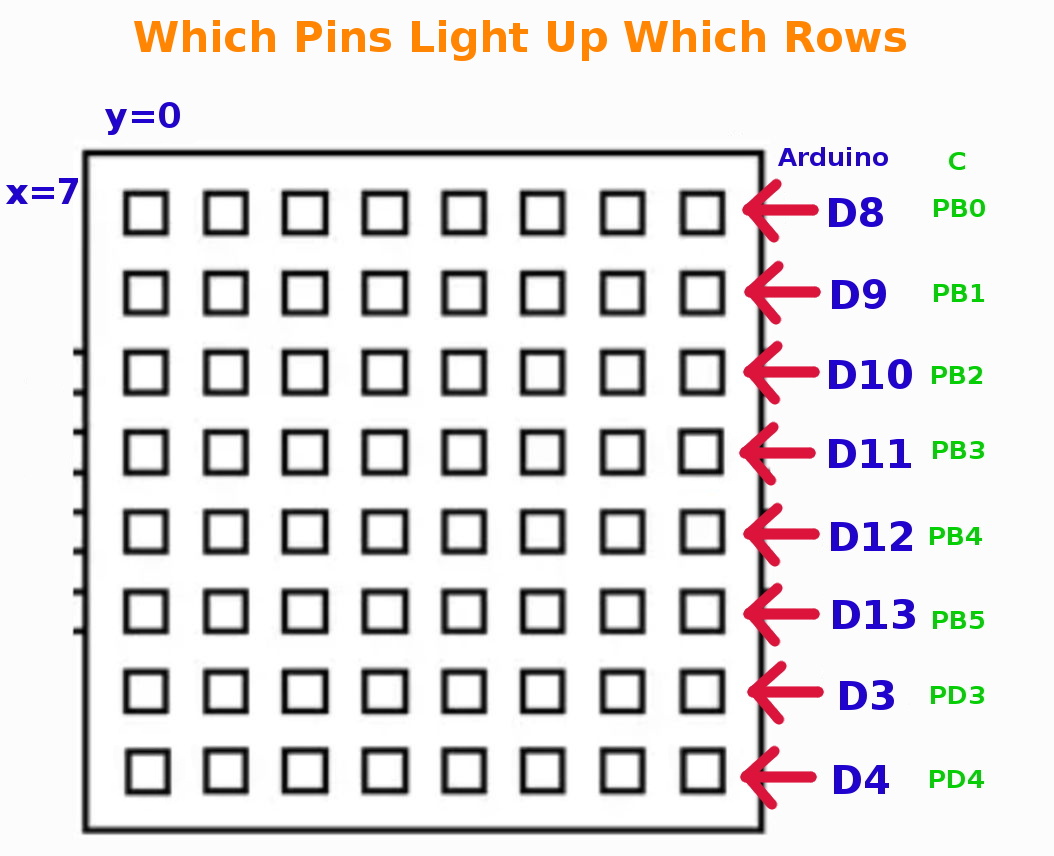
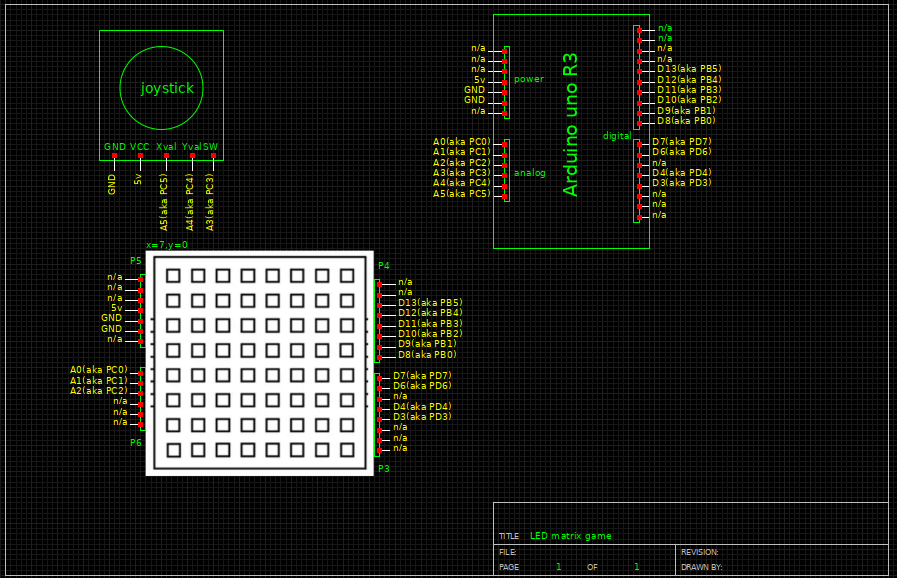
Looking at the code again line by line it turns out it actually does say what each pin does. It's just not written in the most straight forward way. There are 2 pins in PortD for SDA,SCL(aka I2C) which must be arduino pins D6 and D7. And then there are 3 pins in PortC which must be A0-A3. Hold on A0-A3 is 4 pins! So we do have a spear analog pin. It turns out 0x04,0x02and 0x01 are bitmasks for the register meaning 00000100, 00000010, 00000001 respectively. In the atmega328P datasheet it says that portC is a 7 bit register with pins 0-5 + pin 6 being a reset pin. So, we can assume from this that if the positions of A0,A1 and A2 are set high with the bitmasks then A3 is the pin that is not used and therefore we can plug our switch there.
#include "RGBMatrix.h"
/*****************************
set needed registers and define macros
*****************************/
#define RST_BIT 0x04//reset bit
#define LAT_BIT 0x02//latch bit
#define SLB_BIT 0x01//shift load bit
#define SCL_BIT 0x40//serial clock
#define SDA_BIT 0x80//serial data

#define RST PORTC
#define LAT PORTC
#define SLB PORTC
#define SDA PORTD
#define SCL PORTD

...
/*****************
//joystick info
//https://components101.com/modules/joystick-module
//full detail joystick
//https://racheldebarros.com/arduino-projects/using-a-joystick-module-with-arduino-from-wiring-to-coding/
//led mtx info
//connected to 5v,gnd,A0 to A3,D6 to D13, D3 and D4
******************/
#include "RGBMatrix.h"//our modified led mtx library
#include <EEPROM.h>//needed for random nb generation

//for joystick
int xPin = A5;
int yPin = A4;
int buttonPin = A3;
int xVal; // variable for storing joystick x values
int yVal; // variable for storing joystick y values
int buttonState; // variable for storing joystick switch state
//for game(x=7 and y=0 (top left) is start pos of player)
int foodposX=7;
int foodposY=0;
pos playerpos;
int cnt=0;//counts howmany food already eaten
int maxcnt=2;

char j = 0;//for displaying you win, needs to be global

void setup() {
  RGBMatrixInit();

  //for joystick
  pinMode(xPin, INPUT);
  pinMode(yPin, INPUT);
  pinMode(buttonPin, INPUT_PULLUP);

  Serial.begin(9600); // initialize the serial monitor for debugging

//random
  size_t const address {0};
  unsigned int seed {};
  EEPROM.get(address, seed);
  randomSeed(seed);
  EEPROM.put(address, seed + 1);
  //print a random number from 0 to 7
  while(foodposX==7 && foodposY==0){//while foodpos=playerpos
    foodposX = random(0, 8);
    foodposY = random(0, 8);
  }
  ingame(foodposX,foodposY);//display food on led screen
}

void loop() {
  // read the x, y and joystick switch values
  xVal = analogRead(xPin);
  yVal = analogRead(yPin);
  buttonState = digitalRead(buttonPin);

  // print readings to the serial monitor
  Serial.print("X: ");
  Serial.print(xVal);
  Serial.print(" | Y: ");
  Serial.println(yVal);
  Serial.print(" | Switch: ");
  Serial.println(buttonState);

  //while game on
  if(cnt==-1){
    //reset player pos
    resettostart();
    //new random food
    foodposX = 7;
    foodposY = 0;
    while(foodposX==7 && foodposY==0){//while foodpos=playerpos
      foodposX = random(0, 8);
      foodposY = random(0, 8);
    }
    ingame(foodposX,foodposY);//display new food pos on led screen
    displayonboard();
    cnt=0;
  }
  if(cnt<maxcnt){
    playerpos=moveplayer(xVal,yVal);//convert joystick values to gameboard values

    if(playerpos.posX==foodposX && playerpos.posY==foodposY){
      cnt++;
      if(cnt<maxcnt){
        while(foodposX==playerpos.posX && foodposY==playerpos.posY){
          foodposX = random(0, 8);
          foodposY = random(0, 8);
        }
        ingame(foodposX,foodposY);//display new food pos on led screen
      }
    }
  }if(cnt>=maxcnt){//end of game, you win message displayed
        for(j = -32;j < 8;j++){
          displaywin(32,255,255,0,j);
          delay(250);
          buttonState = digitalRead(buttonPin);
          if(buttonState==LOW){
             cnt=-1;
	     break;
          }
        }
    }

 delay(100);
}
#include "RGBMatrix.h"
/*****************************
set needed registers and define macros
*****************************/
#define RST_BIT 0x04//reset bit
#define LAT_BIT 0x02//latch bit
#define SLB_BIT 0x01//shift load bit
#define SCL_BIT 0x40//serial clock
#define SDA_BIT 0x80//serial data

#define RST PORTC
#define LAT PORTC
#define SLB PORTC
#define SDA PORTD
#define SCL PORTD
//multiplexing macros, one for each row + one to turn all off
#define open_line0	{PORTB=0x01;}
#define open_line1	{PORTB=0x02;}
#define open_line2	{PORTB=0x04;}
#define open_line3	{PORTB=0x08;}
#define open_line4	{PORTB=0x10;}
#define open_line5	{PORTB=0x20;}
#define open_line6	{PORTD=0x08;}
#define open_line7	{PORTD=0x10;}
#define close_all_line	{PORTD=0x00;PORTB=0x00;}

/*******************************************
variables
*******************************************/
/*
//Test dots
unsigned char Tdots[8][8][3]=     {{{0,0,255},     {0,0,255},      {0,0,255},     {0,0,255},    {0,0,255},      {0,0,255},       {0,0,255},        {0,0,255}},
                                  {{0,165,255},   {0,165,255},    {0,165,255},   {0,165,255},  {0,165,255},    {0,165,255},     {0,165,255},      {0,165,255}},
                                  {{0,255,255},   {0,255,255},    {0,255,255},   {0,255,255},  {0,255,255},    {0,255,255},     {0,255,255},      {0,255,255}},
                                  {{0,255,0},     {0,255,0},      {0,255,0},     {0,255,0},    {0,255,0},      {0,255,0},       {0,255,0},        {0,255,0}},
                                  {{255,127,0},   {255,127,0},    {255,127,0},   {255,127,0},  {255,127,0},    {255,127,0},     {255,127,0},      {255,127,0}},
                                  {{255,0,0},     {255,0,0},      {255,0,0},     {255,0,0},    {255,0,0},      {255,0,0},       {255,0,0},        {255,0,0}},
                                  {{255,0,139},   {255,0,139},    {255,0,139},   {255,0,139},  {255,0,139},    {255,0,139},     {255,0,139},      {255,0,139}},
                                  {{255,255,255}, {255,255,255},  {255,255,255}, {255,255,255},{255,255,255},  {255,255,255},   {255,255,255},    {255,255,255}}
                                 };
*/
//dots is the array that represents the led mtx, it has 2 pages(one active the other buffer for next display)
unsigned char dots[2][8][8][3] = {0};//initialy turn all leds of mtx off
//dots matrix array description
//[2]:Page:one for display, one for receive data(render next page to display so faster and no flickering)
//[8]:Row:8 rows in LED mtx
//[8]:Column:8 columns in ED mtx
//[3]:Color:RGB data: 0 for Red; 1 for green, 2 for Blue
unsigned char Gamma_Value[3] = {10,63,63};
//Gamma correct value, every LED plane is different.value range is 0~63
//[3]:RGB data, 0 for Red; 1 for green, 2 for Blue
//Gamma correction is a process that adjusts the brightness levels of images to match the non-linear response of the human eye or the display device
unsigned char Page_Index = 0; // the index of buffer( keep track of which "page" or buffer of the dots array is currently being displayed or is active for drawing)

unsigned char line = 0;// index to keep track of which row is being updated

//the gameboard
unsigned char gameboard[8][8] = {{0,0,0,0,0,0,0,1},
				 {0,0,0,0,0,0,0,0},
				 {0,0,0,0,0,0,0,0},
				 {0,0,0,0,0,0,0,0},
				 {0,0,0,0,0,0,0,0},
				 {0,0,0,0,0,0,0,0},
				 {0,0,0,0,0,0,0,0},
				 {0,0,0,0,0,0,0,0}
				};

//player pos intitial pos is top left(7,0)
signed int playerposX=7;
signed int playerposY=0;


/****************define the external data(from font.c file)********************/
extern unsigned char font8_8[100][8];//for displaying letters, ascii char and heart
extern unsigned char panning[1][32];//for you win(8*4 hex values for each colum)
//extern unsigned char pic[4][8][8][3];

/***********set needed pins as outputs*********************/
void _IO_Init(){
  DDRD = (1 << PD7) | (1 << PD6) | (1 << PD4) | (1 << PD3);//set only pins pD7,PD6, PD4 and PD3 as outputs
  DDRB = 0xff; // All PortB pins as outputs

  // Set only PC0-PC2 as outputs, leave A4 (PC4) and A5 (PC5) alone
  DDRC = (1 << PC0) | (1 << PC1) | (1 << PC2);

  // Make sure A4/A5 not driven low
  PORTC &= ~((1 << PC4) | (1 << PC5));
}
/***initialize led mtx*****/
void _LED_Init(){
  LED_RST(1);
  LED_Delay(1);
  LED_RST(0);
  LED_Delay(1);
  LED_RST(1);
  LED_Delay(1);

  SetGamma();
  line = 0;

}
/****initialize timer**********/
void _TC2_Init(){
  TCCR2A = 0;
  TCCR2B |= (1<<CS22) | (1<<CS21) | (0<<CS20);   // by clk/256
  TCCR2A &= ~((1<<WGM21) | (1<<WGM20));   // Use normal mode
  //ASSR |= (1<<AS2);       // Use internal clock - external clock not used in Arduino
  TIMSK2 |= (1<<TOIE2) | (0<<OCIE2B);   //Timer2 Overflow Interrupt Enable
  //TCNT2 = 0xff;
  sei();
}

/***fct that calls all initialization fcts********/
void RGBMatrixInit(){
	_IO_Init();           //Init IO
	_LED_Init();          //Init LED Hardware
	_TC2_Init();          //Init Timer/Count2
}
/****************************************************
timer2 overflow interrupt service routine
every XXXms update led screen
****************************************************/
ISR(TIMER2_OVF_vect){
  //cli();
  TCNT2 = 0xB2; // Preload for 1.25ms period (assuming prescaler 256)
  //TCNT2 = 0x64;      //flash a led matrix frequency is 100.3Hz,period is 9.97ms
  //TCNT2 = 0x63;      //flash a led matrix frequency is 99.66Hz,period is 10.034ms
    if(line > 7) line = 0;
    close_all_line;
    run(line);
    open_line(line);
    line++;
    //sei();
}
/****************************************************
the mtx register operation fcts
****************************************************/
void LED_SDA(unsigned char temp){
  if (temp)
    SDA|=SDA_BIT;
  else
    SDA&=~SDA_BIT;
}

void LED_SCL(unsigned char temp){
  if (temp)
    SCL|=SCL_BIT;
  else
    SCL&=~SCL_BIT;
}

void LED_RST(unsigned char temp){
  if (temp)
    RST|=RST_BIT;
  else
    RST&=~RST_BIT;
}

void LED_LAT(unsigned char temp){
  if (temp)
    LAT|=LAT_BIT;
  else
    LAT&=~LAT_BIT;
}

void LED_SLB(unsigned char temp){
  if (temp)
    SLB|=SLB_BIT;
  else
    SLB&=~SLB_BIT;
}
/***************************************************
led mtx operation
-setGamma fct adjusts color
-run fct updates the led screen
***************************************************/
void SetGamma(){
  unsigned char i = 0;
  unsigned char j = 0;
  unsigned char k = 0;
  unsigned char temp = 0;
  LED_LAT(0);
  LED_SLB(0);
  for(k=0;k<8;k++)
    for(i = 3;i > 0 ;i--)
    {
      temp = Gamma_Value[i-1]<<2;
      for(j = 0;j<6;j++)
      {
        if(temp &0x80)
          LED_SDA(1);
        else
          LED_SDA(0);

        temp =temp << 1;
        LED_SCL(0);
        LED_SCL(1);
    }
  }
  LED_SLB(1);
}
void run(unsigned char k){
  unsigned char i = 0;
  unsigned char j = 0;
  unsigned char p = 0;
  unsigned char temp = 0;
  LED_SLB(1);
  LED_LAT(0);
  for(i = 0;i<8;i++)
  {

    for(j=0;j<3;j++)
    {
      temp = dots[Page_Index][k][i][2-j];
      for(p=0;p<8;p++)
      {
         if(temp & 0x80)
           LED_SDA(1);
         else
           LED_SDA(0);

         temp = temp<<1;
         LED_SCL(0);
         LED_SCL(1);
       }
     }
  }
  LED_LAT(1);
  LED_LAT(0);
}
/****update led mtx row by row****/
void open_line(unsigned char x){
  switch (x)
  {
    case 0 :open_line0;
            break;
    case 1 :open_line1;
            break;
    case 2 :open_line2;
            break;
    case 3 :open_line3;
            break;
    case 4 :open_line4;
            break;
    case 5 :open_line5;
            break;
    case 6 :open_line6;
            break;
    case 7 :open_line7;
            break;
    default: close_all_line;
            break;
  }
}
/******************************************
this fct is needed for ceating the right amount of delay to talk to led mtx board for initialization
******************************************/
void LED_Delay(unsigned char i){
  unsigned int y;
  y = i * 10;
  while(y--);
}

/********************************************************
Name:DispShowChar
Function:Display an English letter on LED matrix
Parameter:chr :the letter we want to show
          R: the value of RED.   Range:RED 0~255
          G: the value of GREEN. Range:RED 0~255
          B: the value of BLUE.  Range:RED 0~255
          bias: the bias(left or right aka offcenter) of a letter on LED Matrix.Range -7~7
********************************************************/
void DispShowChar(char chr,unsigned char R,unsigned char G,unsigned char B,char bias){
  unsigned char i,j,Page_Write,temp;
  unsigned char Char;
  unsigned char chrtemp[24] = {0};

  if ((bias > 8) || (bias < -8))
    return;


  Char = chr - 32;

  if(Page_Index == 0)
    Page_Write = 1;
  if(Page_Index == 1)
    Page_Write = 0;
  j = 8 - bias;
  for(i = 0;i< 8;i++){
    chrtemp[j] = pgm_read_byte(&(font8_8[Char][i]));
    j++;
  }
  for(i = 0;i < 8;i++){

    temp = chrtemp[i+8];
    for(j = 0;j < 8;j++){
      if(temp & 0x80){
        dots[Page_Write][j][i][0] = B;
        dots[Page_Write][j][i][1] = G;
        dots[Page_Write][j][i][2] = R;
      }
      else{
        dots[Page_Write][j][i][0] = 0;
        dots[Page_Write][j][i][1] = 0;
        dots[Page_Write][j][i][2] = 0;
      }
      temp = temp << 1;
    }
  }
  Page_Index = Page_Write;
}
/***************
for the game
***************/

/****things that get changed during game play*****/
void ingame(unsigned int foodposX,unsigned int foodposY){

gameboard[foodposY][foodposX]=1;//to show food on gameboard
}

/****convert joystick values to boardgame values*****/
pos moveplayer(unsigned int joyX, unsigned int joyY){

    // Determine the bias based on joystick input
    if(playerposX>0 && joyY < 100 && joyX < 650 && joyX > 450){ // right
        gameboard[playerposY][playerposX]=0;
	playerposX--;
	gameboard[playerposY][playerposX]=1;

    }else if(playerposX<7 && joyY > 950 && joyX < 650 && joyX > 450){ // left
        gameboard[playerposY][playerposX]=0;
	playerposX++;
	gameboard[playerposY][playerposX]=1;
    }else if(playerposY<7 && joyX>950 && joyY<650 && joyY>450){//down
    	gameboard[playerposY][playerposX]=0;
	playerposY++;
	gameboard[playerposY][playerposX]=1;
    }else if(playerposY>0 && joyX<100 && joyY<650 && joyY>450){//up
    	gameboard[playerposY][playerposX]=0;
	playerposY--;
	gameboard[playerposY][playerposX]=1;
    }

   displayonboard();

    pos position={playerposX,playerposY};
    return position;

}
/*******display gameboard on the led mtx, aka turn gameboard array into dots array********/
void displayonboard(){
unsigned char R, G, B;
 unsigned char Page_Write;
	 // Determine the page to write to
    if(Page_Index == 0)
        Page_Write = 1;
    if(Page_Index == 1)
        Page_Write = 0;


// Draw the character on the display buffer
    for(int i = 0; i < 8; i++){
        for(int j = 0; j < 8; j++){
            if(gameboard[j][i]!=0){
	    	if(j==playerposY && i==playerposX){
	    		R=56; G=233; B=255;
	    	}else{
	    		R=255; G=0; B=0;
	    }
                dots[Page_Write][j][i][0] = R;
                dots[Page_Write][j][i][1] = G;
                dots[Page_Write][j][i][2] = B;
            }
            else{
                dots[Page_Write][j][i][0] = 0;
                dots[Page_Write][j][i][1] = 0;
                dots[Page_Write][j][i][2] = 0;
            }
        }
    }
    // Update the page index for the next frame
    Page_Index = Page_Write;
}

/*****display you win !*******/
void displaywin(char chr,unsigned char R,unsigned char G,unsigned char B,char bias){
  unsigned char i,j,Page_Write,temp;
  unsigned char Char;
  unsigned char chrtemp[24] = {0};

  if ((bias > 32) || (bias < -32))
    return;


  Char = chr - 32;

  if(Page_Index == 0)
    Page_Write = 1;
  if(Page_Index == 1)
    Page_Write = 0;
  j = 8+ bias;
  for(i = 0;i< 32;i++){
    chrtemp[j] = pgm_read_byte(&(panning[Char][i]));
    j++;
  }
  for(i = 0;i <8;i++){

    temp = chrtemp[i+8];
    for(j = 0;j <8;j++){
      if(temp & 0x80){
        dots[Page_Write][j][i][0] = R;
        dots[Page_Write][j][i][1] = G;
        dots[Page_Write][j][i][2] = B;
      }
      else{
        dots[Page_Write][j][i][0] = 0;
        dots[Page_Write][j][i][1] = 0;
        dots[Page_Write][j][i][2] = 0;
      }
      temp = temp << 1;
    }
  }
  Page_Index = Page_Write;
}

/***reset things to restart the game****/
void resettostart(){
  playerposX=7;
  playerposY=0;
  for(int i=0;i<8;i++){
    for(int j=0;j<8;j++){
      gameboard[i][j]=0;
    }
  }
  gameboard[playerposY][playerposX]=1;
}
#ifndef _RGBMATRIX_H_
#define _RGBMATRIX_H_

#include "Arduino.h"

/********************************************************
Name:RGBMatrixInit
Function:initialize RGBMatrixInit
Parameter:none
********************************************************/
void RGBMatrixInit();

/*initilization fcts called by RGBMatrixInit()*/
void _IO_Init();
void _LED_Init();
void _TC2_Init();
/****************************************************
the timer2 overflow interrupt service routine
****************************************************/
ISR(TIMER2_OVF_vect);          //Timer2  Service

/****************************************************
register operations
****************************************************/
void LED_SDA(unsigned char temp);
void LED_SCL(unsigned char temp);
void LED_RST(unsigned char temp);
void LED_LAT(unsigned char temp);
void LED_SLB(unsigned char temp);
/***************************************************
updating the led screen
***************************************************/
void SetGamma();//adjust color
void run(unsigned char k);
void open_line(unsigned char x);
void LED_Delay(unsigned char i);//delay for initialization comunication

/********************************************************
Name:DispShowChar
Function:Display an English letter in LED matrix
Parameter:chr :the letter want to show
          R: the value of RED.   Range:RED 0~255
          G: the value of GREEN. Range:RED 0~255
          B: the value of BLUE.  Range:RED 0~255
          bias: the bias(left or right aka offcenter) of a letter in LED Matrix.Range -7~7
********************************************************/
void DispShowChar(char chr,unsigned char R,unsigned char G,unsigned char B,char bias);

/*****for the game********/

void ingame(unsigned int foodposX,unsigned int foodposY);
void displayonboard();
void displaywin(char chr,unsigned char R,unsigned char G,unsigned char B,char bias);
void resettostart();

/****to send playerpos from library to .ino file********/
struct pos{
  int posX;
  int posY;
};

pos moveplayer(unsigned int joyX,unsigned int joyY);


/********************************************************
Name:DispShowColor
Function:Fill a color in LED matrix
Parameter:R: the value of RED.   Range:RED 0~255
          G: the value of GREEN. Range:RED 0~255
          B: the value of BLUE.  Range:RED 0~255
********************************************************/
//void DispShowColor(unsigned char R,unsigned char G,unsigned char B);

/********************************************************
Name:DispShowColor
Function:Fill a color in LED matrix
Parameter:R: the value of RED.   Range:RED 0~255
          G: the value of GREEN. Range:RED 0~255
          B: the value of BLUE.  Range:RED 0~255
********************************************************/
//void DispShowColor(unsigned char R,unsigned char G,unsigned char B);

/********************************************************
Name:DispShowPic
Function:Fill a picture in LED matrix from FLASH
Parameter:Index:the index of picture in Flash.
********************************************************/
//void DispShowPic(unsigned char Index);


#endif
After we had finally gotten the button to work we had the idea of converting our game into a snake game. We already had the food spawning somewhere else randomly after its been eaten, so we just had to add that the player grows in length everytime it eats.
This sounds difficult but after pondering the problem a bit it was easier than expected. The idea is that the snake is a linked list and you just add an element everytime the snake eats. And to move the snake we shift all the elements towards the tail by one and then add the new position as the head. Now we technically cheated a little because even though arrays are not the most efficient in this case in terms of memory they are just so easy and intuitive to use. So, we just made an array of length 63(8x8=64, minus foodpos=63 possible snake body parts) and only work with the first few array entries until the current snake size is reached. We also made our array into a struct so that we could pass it between our files.
/*****************
//joystick info
//https://components101.com/modules/joystick-module
//full detail joystick
//https://racheldebarros.com/arduino-projects/using-a-joystick-module-with-arduino-from-wiring-to-coding/
//led mtx info
//connected to 5v,gnd,A0 to A3,D6 to D13, D3 and D4
******************/
#include "RGBMatrix.h"//our modified led mtx library
#include <EEPROM.h>//needed for random nb generation

//for joystick
int xPin = A5;
int yPin = A4;
int buttonPin = A3;
int xVal; // variable for storing joystick x values
int yVal; // variable for storing joystick y values
int buttonState; // variable for storing joystick switch state
//for game(x=7 and y=0 (top left) is start pos of player)
int foodposX=7;
int foodposY=0;
snake snake;
int snakesize=1;//counts howmany food already eaten
int maxsnakesize=10;

char j = 0;//for displaying you win, needs to be global

void setup() {
  RGBMatrixInit();

  //for joystick
  pinMode(xPin, INPUT);
  pinMode(yPin, INPUT);
  pinMode(buttonPin, INPUT_PULLUP);

  Serial.begin(9600); // initialize the serial monitor for debugging

//random
  size_t const address {0};
  unsigned int seed {};
  EEPROM.get(address, seed);
  randomSeed(seed);
  EEPROM.put(address, seed + 1);
  //print a random number from 0 to 7
  while(foodposX==7 && foodposY==0){//while foodpos=snake.body[0]
    foodposX = random(0, 8);
    foodposY = random(0, 8);
  }
  ingame(foodposX,foodposY, snakesize);//display food on led screen
}

void loop() {
  // read the x, y and joystick switch values
  xVal = analogRead(xPin);
  yVal = analogRead(yPin);
  buttonState = digitalRead(buttonPin);

  // print readings to the serial monitor
  Serial.print("X: ");
  Serial.print(xVal);
  Serial.print(" | Y: ");
  Serial.println(yVal);
  Serial.print(" | Switch: ");
  Serial.println(buttonState);

  //while game on
  if(snakesize==-1){
    //reset player pos
    resettostart();
    //new random food
    foodposX = 7;
    foodposY = 0;
    while(foodposX==7 && foodposY==0){//while foodpos=snake.body[0]
      foodposX = random(0, 8);
      foodposY = random(0, 8);
    }
    snakesize=1;
    ingame(foodposX,foodposY, snakesize);//display new food pos on led screen
    displayonboard();
  }
  if(snakesize<maxsnakesize){
    snake=moveplayer(xVal,yVal, snakesize);//convert joystick values to gameboard values

    if(snake.body[0].posX==foodposX && snake.body[0].posY==foodposY){
      snakesize++;
      if(snakesize<maxsnakesize){
        for(int i=0; i<snakesize; i++){
          while(foodposX==snake.body[i].posX && foodposY==snake.body[i].posY){
            i=0;
            foodposX = random(0, 8);
            foodposY = random(0, 8);
          }
        }
        ingame(foodposX,foodposY, snakesize);//display new food pos on led screen
      }
    }
  }if(snakesize>=maxsnakesize){//end of game, you win message displayed
        for(j = -32;j < 8;j++){
          displaywin(32,255,255,0,j);
          delay(250);
          buttonState = digitalRead(buttonPin);
          if(buttonState==LOW){
             snakesize=-1;
             break;
          }
        }
    }

 delay(100);
}
#include "RGBMatrix.h"
/*****************************
set needed registers and define macros
*****************************/
#define RST_BIT 0x04//reset bit
#define LAT_BIT 0x02//latch bit
#define SLB_BIT 0x01//shift load bit
#define SCL_BIT 0x40//serial clock
#define SDA_BIT 0x80//serial data

#define RST PORTC
#define LAT PORTC
#define SLB PORTC
#define SDA PORTD
#define SCL PORTD
//multiplexing macros, one for each row + one to turn all off
#define open_line0	{PORTB=0x01;}
#define open_line1	{PORTB=0x02;}
#define open_line2	{PORTB=0x04;}
#define open_line3	{PORTB=0x08;}
#define open_line4	{PORTB=0x10;}
#define open_line5	{PORTB=0x20;}
#define open_line6	{PORTD=0x08;}
#define open_line7	{PORTD=0x10;}
#define close_all_line	{PORTD=0x00;PORTB=0x00;}

/*******************************************
variables
*******************************************/
/*
//Test dots
unsigned char Tdots[8][8][3]=     {{{0,0,255},     {0,0,255},      {0,0,255},     {0,0,255},    {0,0,255},      {0,0,255},       {0,0,255},        {0,0,255}},
                                  {{0,165,255},   {0,165,255},    {0,165,255},   {0,165,255},  {0,165,255},    {0,165,255},     {0,165,255},      {0,165,255}},
                                  {{0,255,255},   {0,255,255},    {0,255,255},   {0,255,255},  {0,255,255},    {0,255,255},     {0,255,255},      {0,255,255}},
                                  {{0,255,0},     {0,255,0},      {0,255,0},     {0,255,0},    {0,255,0},      {0,255,0},       {0,255,0},        {0,255,0}},
                                  {{255,127,0},   {255,127,0},    {255,127,0},   {255,127,0},  {255,127,0},    {255,127,0},     {255,127,0},      {255,127,0}},
                                  {{255,0,0},     {255,0,0},      {255,0,0},     {255,0,0},    {255,0,0},      {255,0,0},       {255,0,0},        {255,0,0}},
                                  {{255,0,139},   {255,0,139},    {255,0,139},   {255,0,139},  {255,0,139},    {255,0,139},     {255,0,139},      {255,0,139}},
                                  {{255,255,255}, {255,255,255},  {255,255,255}, {255,255,255},{255,255,255},  {255,255,255},   {255,255,255},    {255,255,255}}
                                 };
*/
//dots is the array that represents the led mtx, it has 2 pages(one active the other buffer for next display)
unsigned char dots[2][8][8][3] = {0};//initialy turn all leds of mtx off
//dots matrix array description
//[2]:Page:one for display, one for receive data(render next page to display so faster and no flickering)
//[8]:Row:8 rows in LED mtx
//[8]:Column:8 columns in ED mtx
//[3]:Color:RGB data: 0 for Red; 1 for green, 2 for Blue
unsigned char Gamma_Value[3] = {10,63,63};
//Gamma correct value, every LED plane is different.value range is 0~63
//[3]:RGB data, 0 for Red; 1 for green, 2 for Blue
//Gamma correction is a process that adjusts the brightness levels of images to match the non-linear response of the human eye or the display device
unsigned char Page_Index = 0; // the index of buffer( keep track of which "page" or buffer of the dots array is currently being displayed or is active for drawing)

unsigned char line = 0;// index to keep track of which row is being updated

//the gameboard
unsigned char gameboard[8][8] = {{0,0,0,0,0,0,0,0},
				                         {0,0,0,0,0,0,0,0},
				                         {0,0,0,0,0,0,0,0},
				                         {0,0,0,0,0,0,0,0},
				                         {0,0,0,0,0,0,0,0},
				                         {0,0,0,0,0,0,0,0},
				                         {0,0,0,0,0,0,0,0},
				                         {0,0,0,0,0,0,0,0}
				};

//player pos intitial pos is top left(7,0)
/*signed int sn.body[0].posX=7;
signed int sn.body[0].posY=0;
signed int snaketailposX=7;
signed int snaketailposY=0;*/
snake sn={{{7,0}}};
//sn.body[0].posX=3;
//sn.body[0].posY=0;
//sn.body[4].posX=7;
//sn.body[4].posY=0;
//sn.body[5]={sn.body[0],{0,4},{0,5},{0,6},sn.body[4]};
//};

/****************define the external data(from font.c file)********************/
extern unsigned char font8_8[100][8];//for displaying letters, ascii char and heart
extern unsigned char panning[1][32];//for you win(8*4 hex values for each colum)
//extern unsigned char pic[4][8][8][3];

/***********set needed pins as outputs*********************/
void _IO_Init(){
  DDRD = (1 << PD7) | (1 << PD6) | (1 << PD4) | (1 << PD3);//set only pins pD7,PD6, PD4 and PD3 as outputs
  DDRB = 0xff; // All PortB pins as outputs

  // Set only PC0-PC2 as outputs, leave A4 (PC4) and A5 (PC5) alone
  DDRC = (1 << PC0) | (1 << PC1) | (1 << PC2);

  // Make sure A4/A5 not driven low
  PORTC &= ~((1 << PC4) | (1 << PC5));
}
/***initialize led mtx*****/
void _LED_Init(){
  LED_RST(1);
  LED_Delay(1);
  LED_RST(0);
  LED_Delay(1);
  LED_RST(1);
  LED_Delay(1);

  SetGamma();
  line = 0;

}
/****initialize timer**********/
void _TC2_Init(){
  TCCR2A = 0;
  TCCR2B |= (1<<CS22) | (1<<CS21) | (0<<CS20);   // by clk/256
  TCCR2A &= ~((1<<WGM21) | (1<<WGM20));   // Use normal mode
  //ASSR |= (1<<AS2);       // Use internal clock - external clock not used in Arduino
  TIMSK2 |= (1<<TOIE2) | (0<<OCIE2B);   //Timer2 Overflow Interrupt Enable
  //TCNT2 = 0xff;
  sei();
}

/***fct that calls all initialization fcts********/
void RGBMatrixInit(){
	_IO_Init();           //Init IO
	_LED_Init();          //Init LED Hardware
	_TC2_Init();          //Init Timer/Count2
}
/****************************************************
timer2 overflow interrupt service routine
every XXXms update led screen
****************************************************/
ISR(TIMER2_OVF_vect){
  //cli();
  TCNT2 = 0xB2; // Preload for 1.25ms period (assuming prescaler 256)
  //TCNT2 = 0x64;      //flash a led matrix frequency is 100.3Hz,period is 9.97ms
  //TCNT2 = 0x63;      //flash a led matrix frequency is 99.66Hz,period is 10.034ms
    if(line > 7) line = 0;
    close_all_line;
    run(line);
    open_line(line);
    line++;
    //sei();
}
/****************************************************
the mtx register operation fcts
****************************************************/
void LED_SDA(unsigned char temp){
  if (temp)
    SDA|=SDA_BIT;
  else
    SDA&=~SDA_BIT;
}

void LED_SCL(unsigned char temp){
  if (temp)
    SCL|=SCL_BIT;
  else
    SCL&=~SCL_BIT;
}

void LED_RST(unsigned char temp){
  if (temp)
    RST|=RST_BIT;
  else
    RST&=~RST_BIT;
}

void LED_LAT(unsigned char temp){
  if (temp)
    LAT|=LAT_BIT;
  else
    LAT&=~LAT_BIT;
}

void LED_SLB(unsigned char temp){
  if (temp)
    SLB|=SLB_BIT;
  else
    SLB&=~SLB_BIT;
}
/***************************************************
led mtx operation
-setGamma fct adjusts color
-run fct updates the led screen
***************************************************/
void SetGamma(){
  unsigned char i = 0;
  unsigned char j = 0;
  unsigned char k = 0;
  unsigned char temp = 0;
  LED_LAT(0);
  LED_SLB(0);
  for(k=0;k<8;k++)
    for(i = 3;i > 0 ;i--)
    {
      temp = Gamma_Value[i-1]<<2;
      for(j = 0;j<6;j++)
      {
        if(temp &0x80)
          LED_SDA(1);
        else
          LED_SDA(0);

        temp =temp << 1;
        LED_SCL(0);
        LED_SCL(1);
    }
  }
  LED_SLB(1);
}
void run(unsigned char k){
  unsigned char i = 0;
  unsigned char j = 0;
  unsigned char p = 0;
  unsigned char temp = 0;
  LED_SLB(1);
  LED_LAT(0);
  for(i = 0;i<8;i++)
  {

    for(j=0;j<3;j++)
    {
      temp = dots[Page_Index][k][i][2-j];
      for(p=0;p<8;p++)
      {
         if(temp & 0x80)
           LED_SDA(1);
         else
           LED_SDA(0);

         temp = temp<<1;
         LED_SCL(0);
         LED_SCL(1);
       }
     }
  }
  LED_LAT(1);
  LED_LAT(0);
}
/****update led mtx row by row****/
void open_line(unsigned char x){
  switch (x)
  {
    case 0 :open_line0;
            break;
    case 1 :open_line1;
            break;
    case 2 :open_line2;
            break;
    case 3 :open_line3;
            break;
    case 4 :open_line4;
            break;
    case 5 :open_line5;
            break;
    case 6 :open_line6;
            break;
    case 7 :open_line7;
            break;
    default: close_all_line;
            break;
  }
}
/******************************************
this fct is needed for ceating the right amount of delay to talk to led mtx board for initialization
******************************************/
void LED_Delay(unsigned char i){
  unsigned int y;
  y = i * 10;
  while(y--);
}

/********************************************************
Name:DispShowChar
Function:Display an English letter on LED matrix
Parameter:chr :the letter we want to show
          R: the value of RED.   Range:RED 0~255
          G: the value of GREEN. Range:RED 0~255
          B: the value of BLUE.  Range:RED 0~255
          bias: the bias(left or right aka offcenter) of a letter on LED Matrix.Range -7~7
********************************************************/
void DispShowChar(char chr,unsigned char R,unsigned char G,unsigned char B,char bias){
  unsigned char i,j,Page_Write,temp;
  unsigned char Char;
  unsigned char chrtemp[24] = {0};

  if ((bias > 8) || (bias < -8))
    return;


  Char = chr - 32;

  if(Page_Index == 0)
    Page_Write = 1;
  if(Page_Index == 1)
    Page_Write = 0;
  j = 8 - bias;
  for(i = 0;i< 8;i++){
    chrtemp[j] = pgm_read_byte(&(font8_8[Char][i]));
    j++;
  }
  for(i = 0;i < 8;i++){

    temp = chrtemp[i+8];
    for(j = 0;j < 8;j++){
      if(temp & 0x80){
        dots[Page_Write][j][i][0] = B;
        dots[Page_Write][j][i][1] = G;
        dots[Page_Write][j][i][2] = R;
      }
      else{
        dots[Page_Write][j][i][0] = 0;
        dots[Page_Write][j][i][1] = 0;
        dots[Page_Write][j][i][2] = 0;
      }
      temp = temp << 1;
    }
  }
  Page_Index = Page_Write;
}
/***************
for the game
***************/

/****things that get changed during game play*****/
void ingame(unsigned int foodposX,unsigned int foodposY, int snakesize){
  if(snakesize==1){
    gameboard[sn.body[0].posY][sn.body[0].posX]=2;//to show player on gameboard
  }else{
    for(int i=0; i<snakesize-1; i++){
      gameboard[sn.body[i].posY][sn.body[i].posX]=2;//to show player on gameboard
    }
  }

gameboard[foodposY][foodposX]=1;//to show food on gameboard
}

/****convert joystick values to boardgame values*****/
snake moveplayer(unsigned int joyX, unsigned int joyY, int snakesize){

    // Determine the bias based on joystick input
    if(sn.body[0].posX>0 && joyY < 100 && joyX < 650 && joyX > 450 && gameboard[sn.body[0].posY][sn.body[0].posX-1]!=2){ // right
      gameboard[sn.body[snakesize-1].posY][sn.body[snakesize-1].posX]=0;
      for(int i=snakesize-1; i>0; i--){
        sn.body[i].posX=sn.body[i-1].posX;
        sn.body[i].posY=sn.body[i-1].posY;
      }
	    sn.body[0].posX--;
	    gameboard[sn.body[0].posY][sn.body[0].posX]=2;

    }else if(sn.body[0].posX<7 && joyY > 950 && joyX < 650 && joyX > 450 && gameboard[sn.body[0].posY][sn.body[0].posX+1]!=2){ // left
       gameboard[sn.body[snakesize-1].posY][sn.body[snakesize-1].posX]=0;
      for(int i=snakesize-1; i>0; i--){
        sn.body[i].posX=sn.body[i-1].posX;
        sn.body[i].posY=sn.body[i-1].posY;
      }
      sn.body[0].posX++;
      gameboard[sn.body[0].posY][sn.body[0].posX]=2;
    }else if(sn.body[0].posY<7 && joyX>950 && joyY<650 && joyY>450 && gameboard[sn.body[0].posY+1][sn.body[0].posX]!=2){//down
    	gameboard[sn.body[snakesize-1].posY][sn.body[snakesize-1].posX]=0;
      for(int i=snakesize-1; i>0; i--){
        sn.body[i].posX=sn.body[i-1].posX;
        sn.body[i].posY=sn.body[i-1].posY;
      }
      sn.body[0].posY++;
      gameboard[sn.body[0].posY][sn.body[0].posX]=2;
    }else if(sn.body[0].posY>0 && joyX<100 && joyY<650 && joyY>450 && gameboard[sn.body[0].posY-1][sn.body[0].posX]!=2){//up
    	gameboard[sn.body[snakesize-1].posY][sn.body[snakesize-1].posX]=0;
      for(int i=snakesize-1; i>0; i--){
        sn.body[i].posX=sn.body[i-1].posX;
        sn.body[i].posY=sn.body[i-1].posY;
      }
      sn.body[0].posY--;
      gameboard[sn.body[0].posY][sn.body[0].posX]=2;
    }

   displayonboard();

    //pos position={sn.body[0].posX,sn.body[0].posY};
    return sn;

}
/*******display gameboard on the led mtx, aka turn gameboard array into dots array********/
void displayonboard(){
unsigned char R, G, B;
 unsigned char Page_Write;
	 // Determine the page to write to
    if(Page_Index == 0)
        Page_Write = 1;
    if(Page_Index == 1)
        Page_Write = 0;


// Draw the character on the display buffer
    for(int i = 0; i < 8; i++){
        for(int j = 0; j < 8; j++){
            if(gameboard[j][i]!=0){
	    	if(j==sn.body[0].posY && i==sn.body[0].posX){
	    		R=56; G=233; B=255;
	    	}else if(gameboard[j][i]==2){
          R=0; G=255; B=0;

	    	}else{
	    		R=255; G=0; B=0;
	    }
                dots[Page_Write][j][i][0] = R;
                dots[Page_Write][j][i][1] = G;
                dots[Page_Write][j][i][2] = B;
            }
            else{
                dots[Page_Write][j][i][0] = 0;
                dots[Page_Write][j][i][1] = 0;
                dots[Page_Write][j][i][2] = 0;
            }
        }
    }
    // Update the page index for the next frame
    Page_Index = Page_Write;
}

/*****display you win !*******/
void displaywin(char chr,unsigned char R,unsigned char G,unsigned char B,char bias){
  unsigned char i,j,Page_Write,temp;
  unsigned char Char;
  unsigned char chrtemp[24] = {0};

  if ((bias > 32) || (bias < -32))
    return;


  Char = chr - 32;

  if(Page_Index == 0)
    Page_Write = 1;
  if(Page_Index == 1)
    Page_Write = 0;
  j = 8+ bias;
  for(i = 0;i< 32;i++)
  {
    chrtemp[j] = pgm_read_byte(&(panning[Char][i]));
    j++;
  }
  for(i = 0;i <8;i++){

    temp = chrtemp[i+8];
    for(j = 0;j <8;j++){
      if(temp & 0x80){
        dots[Page_Write][j][i][0] = R;
        dots[Page_Write][j][i][1] = G;
        dots[Page_Write][j][i][2] = B;
      }
      else{
        dots[Page_Write][j][i][0] = 0;
        dots[Page_Write][j][i][1] = 0;
        dots[Page_Write][j][i][2] = 0;
      }
      temp = temp << 1;
    }
  }
  Page_Index = Page_Write;
}

/***reset things to restart the game****/
void resettostart(){
  sn.body[0].posX=7;
  sn.body[0].posY=0;
  for(int i=0;i<8;i++){
    for(int j=0;j<8;j++){
      gameboard[i][j]=0;
    }
  }
  gameboard[sn.body[0].posY][sn.body[0].posX]=1;
}
#ifndef _RGBMATRIX_H_
#define _RGBMATRIX_H_

#include "Arduino.h"

/********************************************************
Name:RGBMatrixInit
Function:initialize RGBMatrixInit
Parameter:none
********************************************************/
void RGBMatrixInit();

/*initilization fcts called by RGBMatrixInit()*/
void _IO_Init();
void _LED_Init();
void _TC2_Init();
/****************************************************
the timer2 overflow interrupt service routine
****************************************************/
ISR(TIMER2_OVF_vect);          //Timer2  Service

/****************************************************
register operations
****************************************************/
void LED_SDA(unsigned char temp);
void LED_SCL(unsigned char temp);
void LED_RST(unsigned char temp);
void LED_LAT(unsigned char temp);
void LED_SLB(unsigned char temp);
/***************************************************
updating the led screen
***************************************************/
void SetGamma();//adjust color
void run(unsigned char k);
void open_line(unsigned char x);
void LED_Delay(unsigned char i);//delay for initialization comunication

/********************************************************
Name:DispShowChar
Function:Display an English letter in LED matrix
Parameter:chr :the letter want to show
          R: the value of RED.   Range:RED 0~255
          G: the value of GREEN. Range:RED 0~255
          B: the value of BLUE.  Range:RED 0~255
          bias: the bias(left or right aka offcenter) of a letter in LED Matrix.Range -7~7
********************************************************/
void DispShowChar(char chr,unsigned char R,unsigned char G,unsigned char B,char bias);

/*****for the game********/

void ingame(unsigned int foodposX,unsigned int foodposY, int snakesize);
void displayonboard();
void displaywin(char chr,unsigned char R,unsigned char G,unsigned char B,char bias);
void resettostart();

/****to send playerpos from library to .ino file********/
struct pos{
  int posX;
  int posY;
};

struct snake{
  //pos head;
  //pos tail;
  pos body[63];
};

snake moveplayer(unsigned int joyX,unsigned int joyY, int snakesize);


/********************************************************
Name:DispShowColor
Function:Fill a color in LED matrix
Parameter:R: the value of RED.   Range:RED 0~255
          G: the value of GREEN. Range:RED 0~255
          B: the value of BLUE.  Range:RED 0~255
********************************************************/
//void DispShowColor(unsigned char R,unsigned char G,unsigned char B);

/********************************************************
Name:DispShowColor
Function:Fill a color in LED matrix
Parameter:R: the value of RED.   Range:RED 0~255
          G: the value of GREEN. Range:RED 0~255
          B: the value of BLUE.  Range:RED 0~255
********************************************************/
//void DispShowColor(unsigned char R,unsigned char G,unsigned char B);

/********************************************************
Name:DispShowPic
Function:Fill a picture in LED matrix from FLASH
Parameter:Index:the index of picture in Flash.
********************************************************/
//void DispShowPic(unsigned char Index);


#endif
The next issue to tackle is that we still cant loose. Now thats technically not a problem(I mean who does not like winning?) but we do want to have a bit of a challenge so we wanted to make it such that if the snake touches itself(except for the dot right after the head) that game over is displayed. However, no matter how hard we tried having 2 displaywin function calls in the arduino void loop made the you win display stop at w for no good reason(I guess it really did not want to take the L :)). Eventually we gave up and decided to work on just the if statements for loosing for now. That's when we realized that just restarting the game instead of the whole game over press a button to restart sequence is a much better UI. Who knew that some problems are fixed by avoiding the problem in the first place lol.
/****convert joystick values to boardgame values*****/
snake moveplayer(unsigned int joyX, unsigned int joyY, int snakesize){

    // Determine the bias based on joystick input
    if(sn.body[0].posX > 0 && joyY < 100 && joyX < 650 && joyX > 450){ // right
      if(gameboard[sn.body[0].posY][sn.body[0].posX-1]!=2){
          gameboard[sn.body[snakesize-1].posY][sn.body[snakesize-1].posX]=0;
          for(int i=snakesize-1; i>0; i--){
            sn.body[i].posX=sn.body[i-1].posX;
            sn.body[i].posY=sn.body[i-1].posY;
          }
    	    sn.body[0].posX--;
    	    gameboard[sn.body[0].posY][sn.body[0].posX]=2;
      }else if(sn.body[0].posX-1!=sn.body[1].posX){
        haslost=true;
      }

    }else if(sn.body[0].posX < 7 && joyY > 950 && joyX < 650 && joyX > 450){ // left
      if(gameboard[sn.body[0].posY][sn.body[0].posX+1]!=2){
           gameboard[sn.body[snakesize-1].posY][sn.body[snakesize-1].posX]=0;
          for(int i=snakesize-1; i>0; i--){
            sn.body[i].posX=sn.body[i-1].posX;
            sn.body[i].posY=sn.body[i-1].posY;
          }
          sn.body[0].posX++;
          gameboard[sn.body[0].posY][sn.body[0].posX]=2;
      }else if(sn.body[0].posX+1!=sn.body[1].posX){
        haslost=true;
      }
    }else if(sn.body[0].posY<7 && joyX>950 && joyY<650 && joyY>450){//down
      if(gameboard[sn.body[0].posY+1][sn.body[0].posX]!=2){
        	gameboard[sn.body[snakesize-1].posY][sn.body[snakesize-1].posX]=0;
          for(int i=snakesize-1; i>0; i--){
            sn.body[i].posX=sn.body[i-1].posX;
            sn.body[i].posY=sn.body[i-1].posY;
          }
          sn.body[0].posY++;
          gameboard[sn.body[0].posY][sn.body[0].posX]=2;
      }else if(sn.body[0].posY+1!=sn.body[1].posY){
        haslost=true;
      }
    }else if(sn.body[0].posY>0 && joyX<100 && joyY<650 && joyY>450){//up
      if(gameboard[sn.body[0].posY-1][sn.body[0].posX]!=2){
        	gameboard[sn.body[snakesize-1].posY][sn.body[snakesize-1].posX]=0;
          for(int i=snakesize-1; i>0; i--){
            sn.body[i].posX=sn.body[i-1].posX;
            sn.body[i].posY=sn.body[i-1].posY;
          }
          sn.body[0].posY--;
          gameboard[sn.body[0].posY][sn.body[0].posX]=2;
      }else if(sn.body[0].posY-1!=sn.body[1].posY){
        haslost=true;
      }
    }

   displayonboard();

    //pos position={sn.body[0].posX,sn.body[0].posY};
    return sn;

}
...
 snake=moveplayer(xVal,yVal, snakesize);//convert joystick values to gameboard values
  if(checklost()){
      Serial.println("LOST!!!");
       //Serial.println(snake.body[1].posY);
      snakesize=-1;
      resettostart();
  }
...
...
void resettostart();
bool checklost();
...
This project took way longer than I expected and took twists and turns I could not have foreseen, but thats kind off the fun of it. If nothing happens you have no story, plus you learn more when things dont go as expected but I guess thats to be expected:) . We still have lots of ideas for what we could add to the game and other games we could implement with this hardware, but at the end of the day this project was not about the final result, but rather the joy of making, embracing all its ups and down.
I had lots of fun programming with my friend and who knows mabe one day we'll make a part 2.
You have all the necessary code on this website to recreate the game we have mayde so far, but if your more of a github person the code is also available there:https://github.com/nouralhudaM/LED-Matrix-Game(note if we ever continue this project the github code might be out of sync with this article so dont just blindly download it)
Copyright © 2025, Jessica Socher () and Nour Mofti (https://nourm-portfolio.netlify.app/main)